






Making the jump from a trusty Windows PC to a sleek, high-performance MacBook is an exciting milestone for any professional. The transition usually promises a better display, a faster operating system, and the legendary Apple ecosystem. However, it also brings one of the most frustrating challenges in the modern workspace: the "Connectivity Gap."
Your old PC likely relied on USB-A ports for everything, while your new MacBook is strictly USB-C. Most professional peripherals—especially your audio gear—weren't built for this transition. You find yourself trapped in "dongle hell," carrying a bag of adapters just to get your headset to connect to a Zoom call.
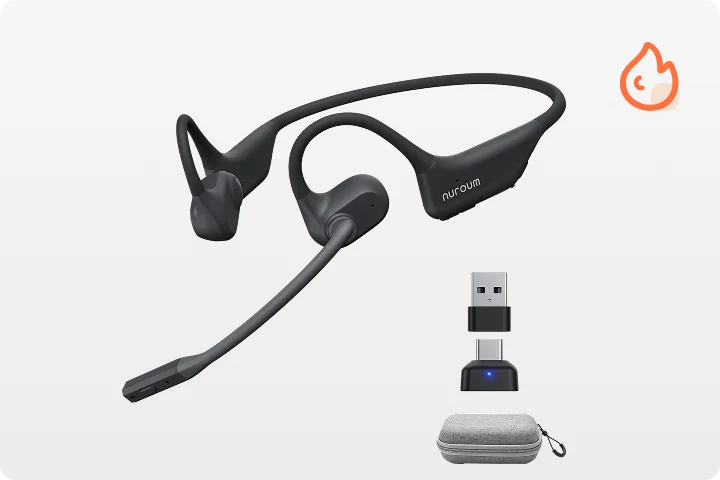
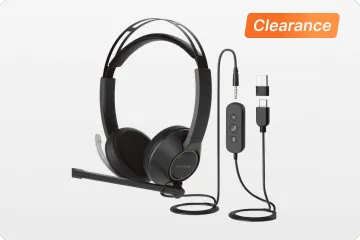
Enter the Nuroum OpenEar Pro 2—not just another open ear wireless headphones with microphone and USB dongle, but a purpose-built dual-dongle solution designed to bridge legacy PCs and modern MacBooks. In this guide, we’ll show why it’s one of the best headsets for MacBook users, and how its dual-receiver design enables seamless switching for today’s hybrid workers.
The Connectivity Gap: Why Switching from PC to MacBook Can Be a Headache
On paper, wireless audio sounds simple. In reality, switching between a Windows PC and a MacBook often exposes fundamental weaknesses in standard Bluetooth headsets.
Bluetooth Wasn’t Built for Hybrid Work
Most Bluetooth headsets are designed for casual, single-device use. Once you introduce multiple operating systems into the workflow, problems emerge:
- Manual reconnection every time you switch devices
- Audio priority conflicts, especially when notifications interrupt meetings
- Latency and compression issues on professional calls
- Inconsistent microphone performance across platforms
MacBooks, in particular, are notorious for prioritizing stability and power efficiency over compatibility with generic Bluetooth peripherals. The result? Random dropouts, delayed audio switching, and unreliable mic input—exactly what professionals can’t afford during live meetings.
Dongles Help—but Only Partially
USB dongles improve stability, but most headsets only include a single receiver. This forces users to constantly unplug and replug the dongle when switching between computers, which defeats the purpose of a wireless workflow.
Dual Dongle Magic: The Ultimate Solution for Computer Headsets Wireless with Mic and USB Dongle
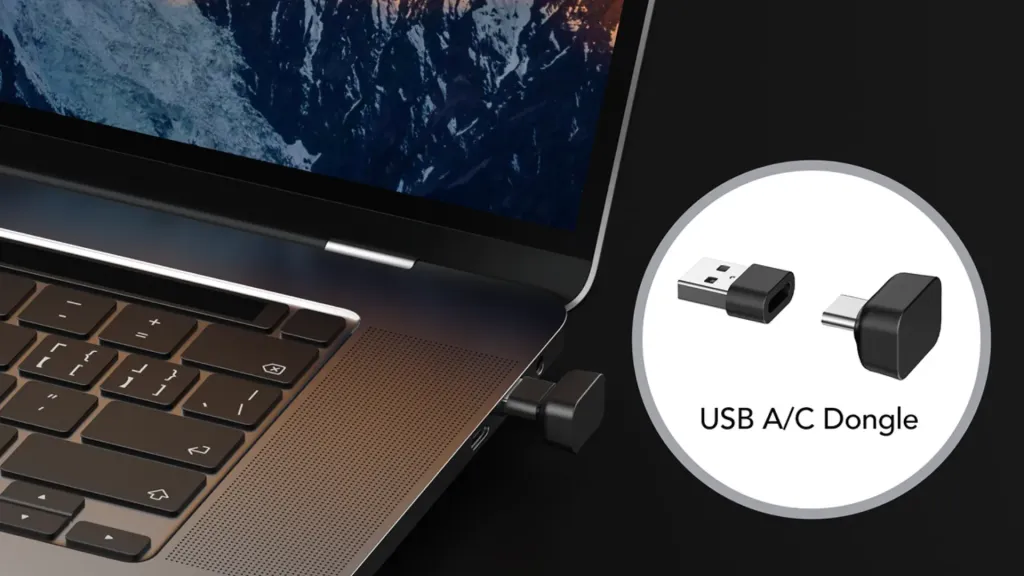
The OpenEar Pro 2 solves this problem at the architectural level with its distinctive dual-dongle system.
What “Dual Dongle” Actually Means
Instead of relying on one USB receiver or unstable Bluetooth multipoint alone, the OpenEar Pro2 supports two dedicated USB wireless receivers—one for each computer.
For example:
- USB dongle #1 stays permanently connected to your old Windows PC
- USB dongle #2 stays connected to your MacBook
The headset with usb dongle intelligently manages both connections, allowing you to switch between systems without unplugging, repairing, or resetting anything.
Why This Matters for Professionals
- Instant device switching based on audio activity
- No Bluetooth negotiation delays
- Consistent microphone quality on both platforms
- True plug-and-play experience for IT-managed or locked-down systems
For anyone searching for computer headsets wireless with mic and USB dongle, this is not a minor upgrade—it’s a fundamental workflow improvement.
Why the OpenEar Pro 2 is the Best Headset for MacBook Users in 2026
Say Goodbye to Bulky Hubs and Adapters
Modern MacBooks are designed to be thin, powerful, and minimal—but that minimalism comes with a practical trade-off. Most MacBook models today offer only two USB-C ports, with no native USB-A interface. For many professionals who work exclusively from a MacBook, this creates an everyday inconvenience: using traditional USB accessories often requires carrying a bulky docking station or multi-port hub.
This is where the Nuroum OpenEar Pro 2 clearly stands apart. With its USB-C wireless receiver, MacBook users can connect the headset directly to the laptop without any dock or adapter. No extra cables, no hubs, and no desk clutter—just true plug-and-play functionality.
For mobile professionals, this matters more than it seems. When you’re working from cafés, coworking spaces, client offices, or traveling between meetings, carrying a docking station solely to support a wireless headset with USB dongle is both impractical and inefficient. The OpenEar Pro 2 eliminates that dependency entirely, allowing MacBook users to maintain a clean, lightweight setup while still enjoying stable, professional-grade wireless audio.
In short, the OpenEar Pro 2 is designed for how MacBook users actually work today: minimal ports, maximum mobility, and zero tolerance for unnecessary accessories. By removing the need for a USB hub, it delivers a seamless, dongle-based wireless experience that fits perfectly into a MacBook-only workflow.
Seamless Integration with macOS
Whether you are using Microsoft Teams, Zoom, or Slack on your Mac, the OpenEar Pro 2 is recognized instantly. The dedicated headset with usb dongle ensures that system-level volume controls and mute buttons sync perfectly with the software—a feature that often fails with generic Bluetooth headsets.
Uncompromising Audio: High-Performance Wireless with Mic for Professional Calls
Connectivity is only half the story. A professional headset must also deliver clear, reliable audio—especially for voice.
Advanced Microphone Noise Reduction
The OpenEar Pro 2 is built for the workplace as one of the top communication headsets for noisy environments. Its ENC microphone captures your voice clearly while filtering ambient noise, ensuring professional audio whether in the office, at home, or on the go. Its microphone system focuses on:
- Clear voice pickup
- Effective background noise suppression
- Consistent performance across platforms
Whether you’re on Zoom, Microsoft Teams, Google Meet, or a VoIP call, your voice remains intelligible—even in shared or noisy spaces.
Open-Ear Comfort for All-Day Wear
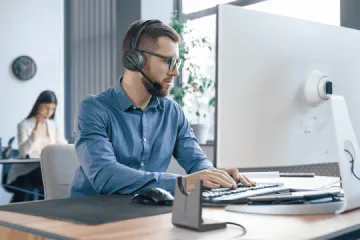
MacBook users often work in creative or high-focus industries, wearing headsets for 8+ hours a day. Traditional over-ear headphones can cause heat buildup and ear fatigue. The OpenEar Pro 2 is a bluetooth headphone open ear design featuring drivers that don’t enter the ear canal, providing comfort for all-day use.
This design allows you to:
- Stay Aware: Hear your doorbell, your colleagues, or traffic while listening to music.
- Reduce Fatigue: Eliminate the "clamped" feeling of traditional headphones.
- Maintain Hygiene: Keep your ears cool and dry.
Comparison: Bluetooth vs. OpenEar Pro 2’s Dedicated USB Receivers
To understand why the OpenEar Pro 2 stands out, it helps to compare it directly with standard Bluetooth solutions.
| Feature | Standard Bluetooth Headsets | OpenEar Pro 2 with Dual USB Receivers |
| Connection Type | Bluetooth only | Dedicated dual USB wireless receivers |
| Cable-Free Use | ✅ Yes | ✅ Yes |
| Device Switching | ❌ Often unstable with multiple devices | ✅ Instant, seamless switching between computers |
| Audio Latency | ❌ Noticeable latency and compression | ✅ Stable, low-latency audio |
| Microphone Quality | ❌ Varies by operating system | ✅ Consistent professional mic performance |
| Reconnection Required | ❌ Frequent manual reconnecting | ✅ No manual reconnection |
| Best Use Case | Casual listening, single-device use | Professional hybrid work, PC + MacBook setups |
| Hardware Requirement | None | USB ports required (reasonable trade-off for stability) |
Conclusion: Future-Proof Your Workspace with the Nuroum OpenEar Pro 2
The transition from a PC to a MacBook shouldn't be a step backward in productivity. By choosing a wireless headset with usb dongle that respects both the old and the new, you save time, reduce frustration, and ensure that your professional image remains intact during every call.
The OpenEar Pro 2 stands out as a premium wireless open ear headphone for MacBook users because it doesn't force you to choose between stability, comfort, and device flexibility. Whether you are plugged into a decade-old desktop or the latest M5 MacBook Pro, you get the same premium, high-definition, and comfortable experience.
Ready to end the "dongle life" and upgrade your professional audio?
Learn more about the OpenEar Pro 2 and its dual-dongle technology here.
FAQs
Do I need a docking station to use it with a MacBook?
No. The OpenEar Pro 2’s USB-C dongle connects directly to your MacBook, eliminating the need for a USB hub or docking station.
Is the microphone suitable for noisy environments?
Yes. Its ENC (Environmental Noise Cancellation) microphone captures your voice clearly while filtering out background noise, making it ideal for open offices, cafés, or coworking spaces.
How does it compare to standard Bluetooth headsets?
Unlike typical Bluetooth headsets, the OpenEar Pro 2 offers low-latency audio, instant multi-device switching, and consistent mic quality across platforms without manual reconnection.
Do I need to install any additional software to use the OpenEar Pro 2?
No. The OpenEar Pro 2 is fully plug-and-play, so you can connect it directly to your devices without downloading any software.



