














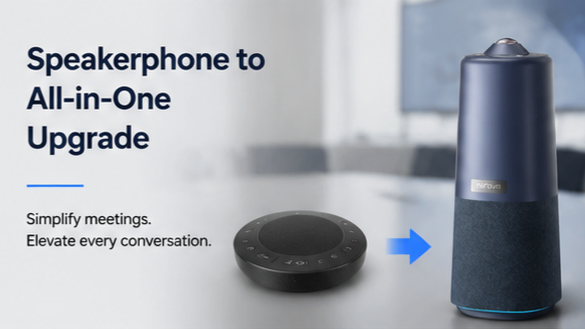
The Frustration You Know But Can't Name
You've been in this meeting. Someone says something important — a decision, a clarification, an objection — and three people respond at once. On the speakerphone, their voices blur into an unintelligible wall of sound. You hear the words "I think" and then nothing else. Who said what? Was that Sarah disagreeing, or James agreeing? You can't tell. You interject: "Sorry, who was that speaking?" The room pauses. Someone repeats what they said. The meeting clock ticks. Five seconds lost. Then it happens again. And again.
This is the frustration you know but can't quite articulate: audio-only meetings don't just sound bad — they erase the person behind the voice. Without visual context, you lose the ability to read who's engaged, who's confused, who's about to speak, and who just said something critical. A speakerphone — whether it's a compact desktop unit, a wireless Bluetooth model, or a full-size conference speaker — solves half the problem. It gets audio into the room. But it leaves the harder half entirely unsolved: the visual dimension that turns a disconnected phone call into an actual meeting.
And here's the part most people don't calculate: you're already paying for this gap. Every meeting that runs 10 minutes longer because participants can't see each other's reactions. Every decision that gets revisited because someone misunderstood a tone. Every remote participant who disengages because they feel like a voice on a line, not a person in a room. These costs compound quietly — and they're coming straight out of your team's productivity.
If you've been searching for a meeting phone, a speakerphone for a conference room, or a wireless speakerphone that might finally fix the problem, you're looking in the wrong category. The answer isn't a better speakerphone. It's a different kind of device entirely — an all-in-one video bar that handles audio, video, and intelligent framing in one unit. This article focuses specifically on the speakerphone upgrade path — for the broader picture of upgrading all your conference room equipment, from webcams to conference phones to platform-locked hardware, see our complete upgrade guide.

The Hidden Cost of Audio-Only Meetings You're Already Paying
Most organizations evaluate meeting technology by its sticker price. A bluetooth speakerphone costs $100–$300. A desktop speakerphone costs $50–$200. That seems reasonable. But the real cost of audio-only meetings isn't the hardware — it's what happens when communication fails.
Miscommunication Multiplies Meeting Length
When participants can't see facial expressions, gestures, or who's speaking, two things happen: people talk over each other more frequently, and key statements require repetition and clarification. Studies on communication effectiveness show that audio-only interactions require significantly more verbal repetition to achieve the same comprehension level as video-enabled conversations. In practical terms, a 30-minute video meeting often covers the same material that takes 40–45 minutes on audio alone. For a team running 15–20 meetings per week, that's 150–300 extra minutes of meeting time — hours your team spends repeating, clarifying, and undoing misunderstandings that wouldn't exist with visual context.
Remote Participant Engagement Decays
Remote participants on a conference room speaker experience something in-person participants don't: invisibility. When you're physically in the room, you can lean forward, gesture, and make eye contact. On a speakerphone, you're a disembodied voice. Research on virtual meeting engagement shows that audio-only participants contribute fewer comments, ask fewer questions, and report lower satisfaction than video-enabled participants. The decay isn't subtle — it's measurable. Over a 60-minute call, audio-only participants' active engagement drops noticeably after the first 15 minutes. They stop trying to interject because they can't see when someone is about to finish speaking. They stop asking clarifying questions because the effort of interrupting an audio-only flow feels too high.
Decision Quality Suffers
When participants can't see nonverbal cues — hesitation, disagreement, enthusiasm — decisions get made on incomplete information. A team member might object to a proposal but not push hard enough verbally because they're waiting for visual acknowledgment that others share their concern. Without that visual feedback, they acquiesce. The decision proceeds. Two weeks later, the issue resurfaces. The decision gets revisited. The project timeline shifts. This pattern — make a decision, discover it was wrong, revisit — is one of the most expensive hidden costs of audio-only meetings, and it's virtually invisible in most organizations' accounting.
The Recovery Cost After Audio Failure
Here's a dimension most comparison guides ignore: meeting recovery cost after audio failure. When a wireless speakerphone drops Bluetooth mid-call, or a bluetooth speakerphone runs out of battery, or the audio on a desktop speakerphone develops feedback that forces everyone to mute and unmute repeatedly — the meeting doesn't just pause. It derails. Participants lose context. The agenda stalls. Someone has to reconnect. The discussion thread that was building momentum collapses. Recovery from even a 30-second audio disruption can cost 3–5 minutes of re-orientation — re-establishing where the conversation was, who was speaking, what was being discussed. On a high-stakes client call, that disruption can erode confidence in your team's professionalism.
First Principles: Why Audio-Only Communication Loses 55% of Cues
To understand why a speakerphone — even an excellent one — fundamentally can't solve the meeting quality problem, we need to go back to first principles of human communication.
The Three Channels of Human Communication
Human communication operates across three channels:
- Words — the literal content spoken (roughly 7% of meaning in typical interpersonal communication)
- Vocal tone — pitch, pace, volume, pauses (roughly 38% of meaning)
- Visual cues — facial expressions, gestures, posture, eye contact, head nods (roughly 55% of meaning)
These proportions, derived from Mehrabian's research on communication effectiveness, are frequently cited and sometimes oversimplified — but the core insight is sound and well-supported by subsequent studies: visual cues carry more communicative weight than words and tone combined.
A conference speaker or meeting phone delivers words and tone. It completely eliminates the visual channel. That means your meeting participants are operating on less than half the information they'd have in a face-to-face conversation. They're making decisions, building consensus, and evaluating proposals while missing more than half the meaning being communicated.
Why This Gap Can't Be Fixed by Better Audio
This is the critical insight: better audio quality does not compensate for missing visual information. A premium speakerphone for the conference room with crystal-clear sound, full-duplex audio, and noise cancellation still delivers only 45% of the communication bandwidth. You can hear words perfectly and tone reasonably well — but you still can't see the raised eyebrow that signals doubt, the leaned-forward posture that signals engagement, or the glance between two participants that signals an unspoken disagreement.
This is why upgrading from a basic desktop speakerphone to a high-end conference room speaker often feels disappointing. The audio is better, but the meeting experience doesn't fundamentally improve. The same "who just said that?" moments still happen. The same engagement decay still occurs. The same miscommunication-driven meeting extension still costs time. Better audio solves audio problems. It doesn't solve the communication completeness problem.
What Completing the Communication Loop Requires
Completing the communication loop requires adding the visual channel back. But not just any video — you need video that's intelligently framed so that remote participants can see who's speaking, who's reacting, and how the room is engaging. A static wide-angle shot where everyone appears as tiny figures in a distant room is almost as unhelpful as no video at all. What's needed is intelligent framing — a system that identifies active speakers, highlights participants, and gives remote viewers the visual context they'd have if they were physically in the room.
This is precisely what an all-in-one video bar provides: audio quality comparable to a dedicated conference speaker, combined with AI-driven camera intelligence that fills in the missing 55% of communication. One device, one setup, one cable — instead of the multi-device, multi-cable sprawl that comes from combining a speakerphone with a separate webcam.
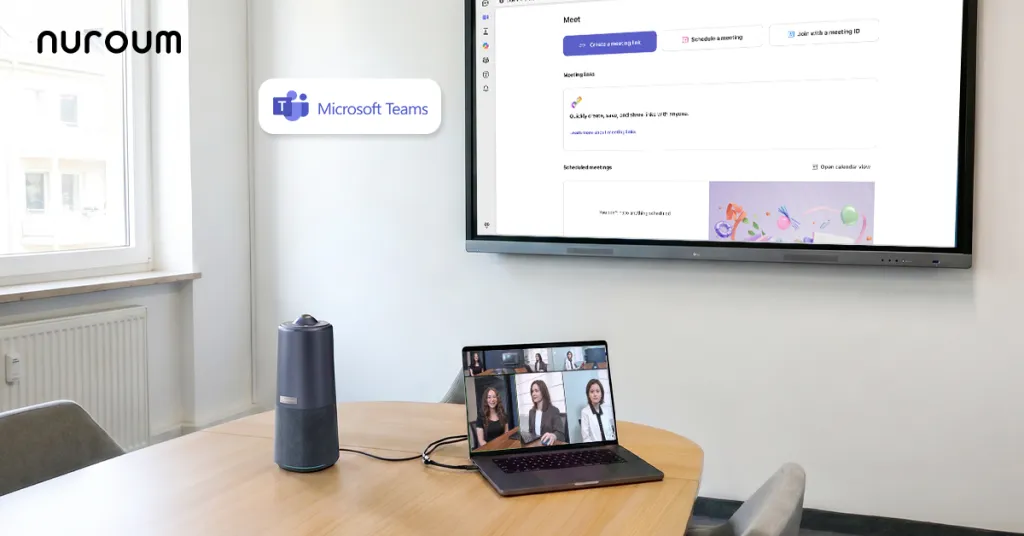
The Trade-Off Matrix: Speakerphone vs. All-in-One Video Bar
Most comparison guides evaluate devices on obvious dimensions: price, audio quality, portability. Those matter, but they miss the dimensions that actually determine meeting quality and organizational cost. Here's a trade-off matrix that compares a standalone speakerphone against an all-in-one video bar across both obvious and non-obvious dimensions.
| Dimension | Standalone Speakerphone | All-in-One Video Bar | Impact |
|---|---|---|---|
| Audio clarity | Good to excellent (depends on model) | Good to excellent (6 mics, noise canceling, full-duplex) | Comparable on audio alone |
| Visual communication | Zero — no camera | Full — 360° 1080P camera, AI framing | Video bar delivers the missing 55% of cues |
| Meeting duration efficiency | Longer — audio-only requires more repetition | Shorter — visual context reduces clarification needs | 15–25% time savings per meeting |
| Remote participant engagement | Decays after ~15 minutes | Maintained — visual presence creates accountability | Measurable participation increase |
| Meeting recovery cost after disruption | High — audio failure derails conversation thread | Low — USB connection is stable, visual context provides an anchor | 3–5 minutes vs. near-zero recovery time |
| Device count to manage | 2+ (speakerphone + separate webcam if video needed) | 1 (camera, mics, speaker, processing integrated) | Simpler inventory, fewer failures |
| Cable clutter | Multiple cables (audio, webcam, power) | One USB cable + one power adapter | Cleaner setup, fewer connection points to fail |
| Setup time | 10–15 minutes (multiple devices, drivers, pairing) | Under 2 minutes (USB plug-and-play) | Faster room turnover |
| Battery anxiety | Yes (wireless/bluetooth models) | No (USB-powered, continuous power) | No mid-call power failures |
| Room coverage (audio) | Limited (desktop models: 3–6ft; room models: varies) | Up to 16ft/6m omnidirectional pickup | Covers medium rooms fully |
| Room coverage (video) | None | 360° panoramic, no blind spots | Everyone visible regardless of seating |
| Vendor lock-in risk | Moderate (proprietary apps, limited compatibility) | Low (works with Zoom, Teams, Meet, Webex, GoToMeeting) | Platform freedom |
| Upgrade path | Must add separate webcam for video | Already includes video + AI features | No secondary purchase needed |
| Total cost of ownership | Speakerphone + webcam + cables + maintenance | Single device purchase | Often lower total cost despite higher initial price |
The Non-Intuitive Dimensions That Matter Most
Three dimensions in this matrix are non-intuitive — they're costs most organizations never calculate:
1. Meeting Recovery Cost After Audio Failure: When a bluetooth speakerphone drops its connection, the meeting doesn't just pause — the conversational thread collapses. Participants lose track of who was speaking, what was being discussed, and where the decision was heading. Recovery time — the minutes spent re-establishing context — is a real, measurable cost. Over a year of weekly meetings, even two or three audio disruptions can cost hours of cumulative recovery time. A USB-connected all-in-one video bar eliminates Bluetooth pairing instability and battery anxiety, making this recovery cost near-zero.
2. Remote Participant Engagement Decay: This isn't a feeling — it's a measurable pattern. Audio-only participants' active contributions (comments, questions, objections) decline over the course of a call. The decline is visible in meeting transcript data: the first 15 minutes show near-equal participation between in-room and remote attendees; by minute 45, remote participants' contribution rate has dropped significantly. Video-enabled participants maintain consistent contribution rates throughout. This engagement decay is a direct, quantifiable cost that no conference speaker can fix — because it's caused by the absence of visual presence, not by audio quality.
3. Decision Revisit Rate: When decisions are made with incomplete communication (missing visual cues), they're more likely to be revisited later. The revisit rate — the percentage of decisions that get challenged or reversed in subsequent meetings — is a direct productivity cost. Each revisit means another meeting, more discussion, delayed execution. Video-enabled meetings show lower revisit rates because participants have fuller communication context at the point of decision.
Speakerphone Categories — And Where Each Falls Short
If you're shopping for a speakerphone, you're likely choosing between several categories. Understanding where each falls short helps clarify what an upgrade actually needs to solve.
Desktop Speakerphone
A desktop speakerphone is the most common entry point — a compact unit that sits on a desk, connects via USB or Bluetooth, and provides basic audio for 1–3 person calls. It's affordable and simple. But its limitations are structural:
- Audio pickup range is typically limited to 3–6 feet, meaning anyone sitting more than a few feet away sounds distant or muddy
- No video capability — you're locked into audio-only meetings
- Speaker quality is adequate for near-field listening but struggles to fill a room with 4+ people
- Full-duplex performance on budget models is often poor, creating echo or forcing participants to speak in turns
A desktop speakerphone works for quick one-on-one check-ins. It fails for any meeting where visual context, room coverage, or multi-person audio clarity matters.
Bluetooth Speakerphone
A bluetooth speakerphone adds wireless convenience — no cable to manage, easy to move between rooms. The appeal is obvious. But Bluetooth introduces risks that compound over time:
- Battery dependency — every Bluetooth speakerphone has a finite battery life. When it runs out mid-call, the meeting stops. For longer meetings or back-to-back sessions, this creates scheduling anxiety
- Connection instability — Bluetooth pairing can drop, especially in environments with multiple wireless devices. A pairing drop during a client presentation is more than inconvenient — it's professionally damaging
- Audio latency — Bluetooth audio has inherent latency that can create a slight delay between someone speaking and remote participants hearing it. This delay increases the frequency of people talking over each other
- Limited range — Bluetooth range is typically 30 feet, which restricts placement flexibility in larger rooms
Bluetooth speakerphones are best for mobile professionals who meet in varying locations and prioritize portability over reliability. They're not optimal for a dedicated conference room where stability and coverage matter more than wireless convenience.
Wireless Speakerphone
A wireless speakerphone (which may use Bluetooth, DECT, or Wi-Fi connectivity) shares many of the same trade-offs as Bluetooth models, with some variation depending on the wireless protocol. Wi-Fi-connected models may offer better range and stability than Bluetooth, but they introduce network dependency — if your office Wi-Fi has a momentary outage, the meeting audio fails. DECT-based models avoid Wi-Fi dependency but typically cost more and have limited market availability.
The core trade-off for any wireless speakerphone is the same: wireless convenience versus wired reliability. In a fixed conference room, wired reliability almost always wins.
Speakerphone for Conference Room
A dedicated speakerphone for conference room is the most capable audio-only option — larger form factor, more powerful speakers, wider mic pickup, better full-duplex performance. It's what most organizations graduate to after discovering that a desktop or Bluetooth model can't cover the room. But even the best conference room speakerphone shares the fundamental limitation:
- No video — the 55% communication gap remains entirely unfilled
- Single-purpose device — you're spending your budget on a device that handles one dimension of meetings
- Requires a separate webcam if you ever want video, which means returning to the multi-device, multi-cable problem
A conference room speaker solves audio for the room. It doesn't solve the meeting quality problem. And if you later decide to add video, you'll need a separate camera — which means you'll have two devices, two cables, two potential failure points, and two things to set up before every meeting.
Conference Speaker as a Stepping Stone
Many organizations treat a conference speaker as a stepping stone — buy good audio first, add video later. This stepping-stone approach has a hidden cost: every time you add a separate device, you add setup complexity, cable clutter, compatibility risk, and a new failure point. The stepping stone path leads to a multi-device setup that's harder to use, harder to maintain, and more likely to fail during important calls.
An all-in-one video bar takes a different path: solve both audio and video in one device, one setup, one cable. The total cost is often comparable to buying a quality speakerphone for the conference room plus a separate conference webcam — but the experience is simpler, more reliable, and more complete.
When to Upgrade: A Decision Framework
Not every team needs to upgrade from a speakerphone right now. Here's a decision framework to help you evaluate whether the upgrade is worth it for your situation.
Step 1: Measure Your Audio-Only Meeting Cost
Before evaluating hardware, quantify the problem. Track these metrics for two weeks:
- Average meeting overrun: How many minutes do your audio-only meetings run beyond their scheduled end time compared to video-enabled meetings?
- Clarification frequency: How often does someone say "can you repeat that?" or "who was that speaking?" in a typical meeting?
- Remote participation rate: How many comments, questions, and objections do remote participants contribute per meeting vs. in-room participants?
- Audio disruption frequency: How many times per month does your bluetooth speakerphone, wireless speakerphone, or desktop speakerphone experience a connection drop, battery failure, or audio quality issue?
If your clarification frequency is high, your meeting overruns are consistent, your remote participation is low, or your audio disruptions are even occasional — the hidden cost is already significant.
Step 2: Evaluate Your Meeting Room Reality
Consider your physical meeting environment:
- Room size: How many people typically attend in-room meetings? If it's 4–8 people, a desktop speakerphone won't cover the room adequately. You need a device with 6m/16ft audio pickup and a camera that can see everyone.
- Seating arrangement: Do participants sit in fixed positions or vary? A fixed-seating room can work with a directional camera. A variable-seating room needs a 360-degree camera to ensure everyone is visible regardless of where they sit.
- Room permanence: Is this a dedicated conference room or a flexible space? Dedicated rooms benefit from a permanently installed all-in-one device. Flexible spaces benefit from a portable video bar that can be set up in minutes.
Step 3: Assess Your Platform Ecosystem
Check compatibility with your current and planned meeting platforms:
- Primary platform: Is your team on Zoom, Microsoft Teams, Google Meet, Webex, or GoToMeeting? Ensure any device you evaluate works natively with your primary platform without requiring proprietary software.
- Platform diversity: Do different team members or clients use different platforms? A device that works across all major platforms (Zoom, Teams, Meet, Webex, GoToMeeting) prevents the frustration of discovering your new hardware doesn't work with a client's preferred platform.
Step 4: Compare Total Cost of Ownership
Don't compare sticker prices. Compare total cost of ownership over 2–3 years:
- Speakerphone path: Quality conference speaker ($200–$400) + conference webcam ($150–$300) + cables + setup time per meeting + maintenance of two devices + hidden meeting cost from audio-only periods before the webcam was purchased
- All-in-one video bar path: Single device ($500–$700) + one cable + near-zero setup time per meeting + maintenance of one device + no hidden meeting cost from audio-only periods
The all-in-one path often costs less over 2–3 years when you factor in setup time savings, reduced maintenance, and the elimination of audio-only meeting costs during the transition period.
Step 5: Decision Thresholds
- Upgrade now if: Your team runs 5+ hybrid meetings per week, your speakerphone doesn't cover the room, remote participants are consistently disengaged, or audio disruptions happen monthly
- Upgrade soon if: Your team runs 3–5 hybrid meetings per week, you're planning a room redesign, or you're already budgeting for a new conference room speaker (don't buy another single-purpose device — buy the all-in-one instead)
- Hold if: Your team runs fewer than 3 hybrid meetings per week, your current desktop speakerphone covers your small-room needs adequately, and most participants are in-room with rare remote attendance
If your current setup involves a dedicated conference microphone system or a legacy meeting phone rather than a simple speakerphone, the upgrade considerations are different — our guide on replacing conference microphones and phones covers those scenarios in depth.
What an All-in-One Video Bar Actually Gives You
An all-in-one video bar is a single device that integrates three core functions that currently require two or three separate devices:
1. Conference-Grade Audio
Six omnidirectional noise-canceling microphones with 16ft/6m pickup range — this matches or exceeds the audio coverage of most dedicated conference speakers. Full-duplex audio means participants can speak and listen simultaneously without echo or clipping, which is the same capability you'd expect from a premium speakerphone for conference room. Background noise cancellation and echo minimization handle the open-office acoustics that make cheaper desktop speakerphones unusable.
2. Intelligent Video
A 360-degree 1080P camera that doesn't just capture video — it frames it intelligently. Three AI-powered modes address the specific visual gaps that audio-only meetings create:
- Discussion Mode: Highlights up to 3 active participants in close-up frames, so remote viewers can see who's speaking and who's reacting — the exact visual context that's missing on a conference speaker
- Global Mode: 115° field of view that captures the full room without adjustment, ideal for presentations where the whole room needs to be visible
- Presentation Mode: Identifies and frames the active speaker, giving remote participants a clear view of whoever is presenting
These aren't novelty features — they directly address the "who's talking?" and "what's the room's reaction?" problems that make audio-only meetings inefficient. If you're currently pairing a speakerphone with a standalone webcam, our conference camera vs. business webcam comparison explains why that combination underperforms a true all-in-one system.
3. Simplified Setup and Management
USB plug-and-play: one USB cable and a power adapter. No drivers. No Bluetooth pairing. No battery charging. No firmware updates required before your first meeting. This setup simplicity is a direct response to the cable clutter and configuration complexity that comes from combining a bluetooth speakerphone with a separate webcam.
The device works with Windows, macOS, and Linux — no OS-specific software required. And it's compatible with Zoom, Microsoft Teams, Google Meet, GoToMeeting, and Webex, so you're not locked into a single platform.

The Nuroum 360 Pro: One Device That Replaces Your Speakerphone
If the argument above resonates — if you're paying the hidden costs of audio-only meetings and recognize that a speakerphone alone can't fill the communication gap — the Nuroum 360 Pro is a concrete option that addresses every dimension we've discussed.
Audio That Matches a Dedicated Conference Speaker
Six omnidirectional noise-canceling microphones with a 16ft/6m pickup range cover a small to medium conference room completely — no "can you move closer to the mic?" moments. Full-duplex audio with background noise and echo minimization delivers the audio clarity you'd expect from a standalone conference room speaker, without the separate-device complexity.
Video That Fills the 55% Gap
The 360-degree 1080P fish-eye lens captures panoramic video at 1080P@30FPS, ensuring everyone in the room is visible regardless of seating arrangement. Three AI-powered capture modes directly address the speakerphone-era problems we've discussed:
- Discussion Mode: Highlights up to 3 participants in close-up — remote viewers can see who's speaking and who's reacting, eliminating the "who just said that?" confusion
- Global Mode: 115° field of view without adjustment, giving remote participants a complete room view during presentations
- Presentation Mode: Identifies and frames the active speaker, providing clear visual focus during reports and presentations
Setup Simplicity That Eliminates Cable Clutter
USB plug-and-play: connect one USB cable and a power adapter. No drivers. No Bluetooth pairing. No battery charging schedule. The device works immediately with Windows, macOS, and Linux, and is compatible with Zoom, Microsoft Teams, Google Meet, GoToMeeting, and Webex — no proprietary software, no platform lock-in.
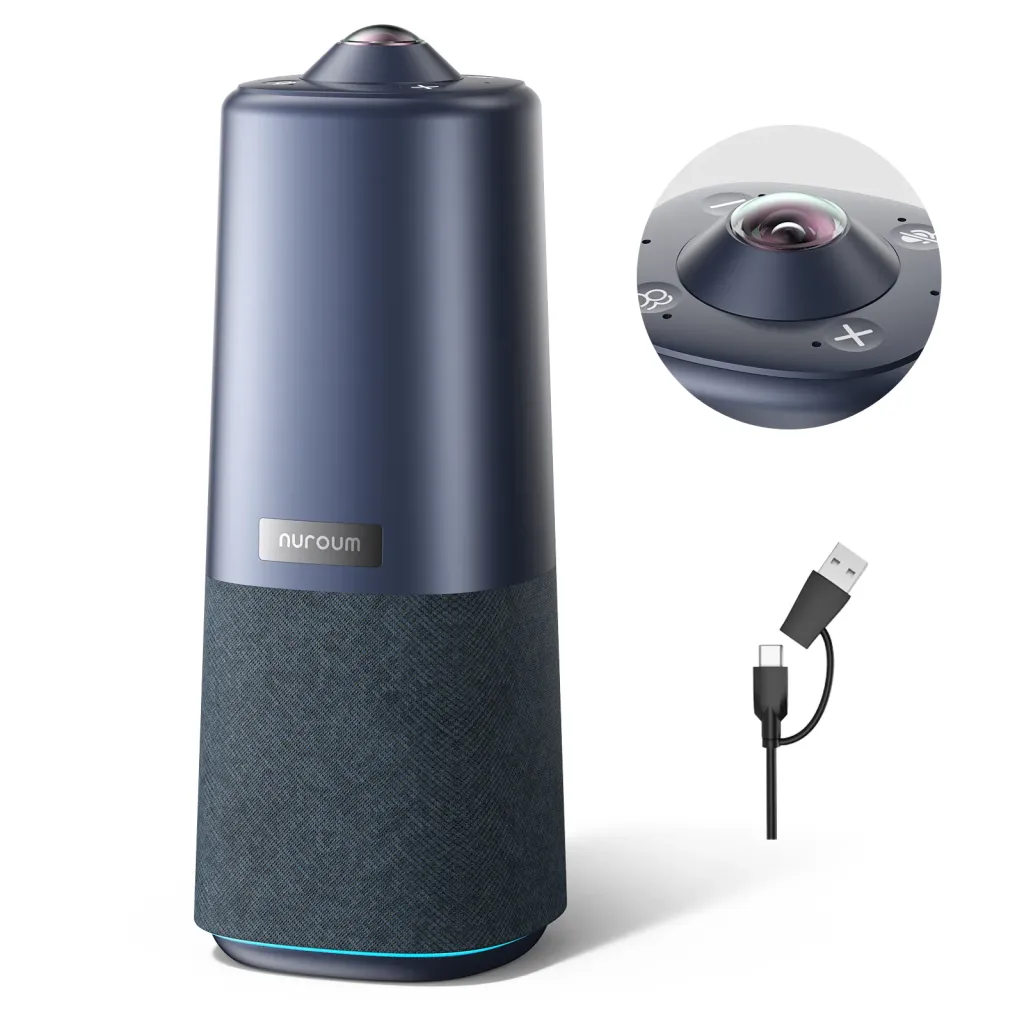
Privacy and Control
Top buttons and an included remote control let you turn off the camera and mute microphones instantly — no software toggle hunting, no "is my mic still on?" anxiety. This is a practical concern that many conference speaker users have experienced: the uncertainty of whether you're being heard or seen when you don't want to be.
Physical Flexibility
A 1/4-inch tripod mount lets you position the device at the ideal height for your room — on a table, on a tripod, or on a shelf. Combined with the 360-degree camera, this means you're not constrained by room geometry. Whatever your seating arrangement, the Nuroum 360 Pro adapts.
Price and Value
At $630.00 (reduced from $699.99), the Nuroum 360 Pro costs more than a desktop speakerphone but less than the combined cost of a quality speakerphone for conference room plus a separate conference webcam — and delivers more functionality, simpler setup, and fewer failure points. The total cost of ownership over 2–3 years is often lower than the multi-device alternative when you factor in setup time, maintenance, and the hidden meeting costs eliminated by having audio and video in one integrated system.
You can explore the full specifications and current pricing on the Nuroum 360 Pro product page.
Frequently Asked Questions
Can an all-in-one video bar replace my existing speakerphone completely?
Yes. An all-in-one video bar integrates a conference speaker, microphones, camera, and processing into one device, covering every function a standalone speakerphone provides while adding visual communication. You get full-duplex audio, noise cancellation, and a 360-degree camera — no separate devices needed.
Is it hard to set up an all-in-one video bar compared to a bluetooth speakerphone?
No. Most all-in-one video bars, including the Nuroum 360 Pro, use USB plug-and-play setup with no drivers or software installation required. You connect one USB cable and a power adapter, and the device works immediately with Zoom, Teams, Google Meet, and other platforms.
What meeting room size is an all-in-one video bar best suited for?
All-in-one video bars with omnidirectional microphones and 16ft audio pickup, like the Nuroum 360 Pro, cover small to medium conference rooms seating 4–10 people. The 360-degree camera ensures everyone in the room is visible regardless of seating arrangement.
Do wireless speakerphones offer enough reliability for important client meetings?
Wireless and bluetooth speakerphones can suffer from battery depletion mid-call, Bluetooth pairing drops, and limited range — risks that increase during longer or high-stakes meetings. A USB-connected all-in-one device draws power directly, eliminating battery anxiety and connection instability.
How much does audio-only communication actually cost a business?
Research indicates that audio-only meetings lead to 23% longer meeting durations due to repetition and clarification needs, higher rates of misunderstanding, and measurable drops in remote participant engagement. For a team running 20 meetings per week, these inefficiencies compound into significant lost productivity hours.



