







































The Problem with Fragmented Conference Room Equipment
You walk into the conference room three minutes before a client call. The room has a webcam perched on top of the display, a separate speakerphone sitting in the middle of the table, a USB hub with a tangle of cables, and somebody's abandoned HDMI adapter from the last meeting. The webcam's driver hasn't been updated since the last OS patch. The speakerphone's battery is flashing red at 8%. Half the cables are unlabeled. You need to share your screen, and the remote participant needs to hear and see everyone in the room clearly.
This is the fragmented conference room — and it is the single largest source of meeting friction in modern workplaces.
When conference room equipment is assembled piece by piece, each component introduces its own failure mode. The webcam works with your laptop but the microphone doesn't auto-switch from the built-in laptop mic to the external speakerphone. The speakerphone's Bluetooth pairing drops when someone's phone rings nearby. The USB hub doesn't deliver enough power to run both the camera and the speaker simultaneously. And when something breaks, nobody knows which piece to replace — or even who bought it originally.
IT teams feel this pain acutely. Conference room AV support tickets consume a disproportionate share of help desk resources. A single room with a webcam, speakerphone, display adapter, and USB hub creates at least four distinct points of potential failure — each with its own firmware version, driver requirements, and compatibility matrix. When you multiply that across a floor of meeting rooms, the support burden becomes staggering.
The root cause is straightforward: most conference rooms were never designed as integrated systems. They evolved by accretion — a webcam was added when remote meetings became common, a speakerphone was added when audio quality became an issue, a USB hub was added when ports ran out. Each addition solved an immediate problem while creating new ones downstream. The result is a room where "just start the meeting" becomes a ten-minute diagnostic ritual: check the camera, test the mic, pair the speaker, find the right adapter, restart the app, apologize to the remote participants for the delay.
This is not a small inconvenience. In organizations with ten or more meeting rooms, the cumulative time lost to equipment troubleshooting can exceed hundreds of hours per year. Multiply that by the fully loaded cost of the people waiting in those rooms, and the financial impact of fragmented conference room equipment dwarfs the cost of the equipment itself.
Beyond the time waste, fragmented setups create a platform dependency problem. When you buy a Cisco room kit, it works beautifully with Webex — but migrating to Zoom or Teams means replacing the hardware. When you standardize on a specific webcam model, a macOS update can break the driver with no fix timeline from the vendor. And when you mix brands — a Logitech camera with a Jabra speakerphone — you're operating in a compatibility no-man's-land where neither vendor takes responsibility for the integration.
These problems have a common origin and a common solution. The origin is the assumption that conference room equipment should be purchased and managed as individual peripherals. The solution is the all-in-one conference device — but understanding why that solution works requires looking at how meeting room technology evolved.
The All-in-One Revolution: Why Consolidation Is the Natural Endpoint
To understand why all-in-one conference room equipment represents the natural endpoint of meeting room technology, it helps to start from first principles. What does a conference room actually need to do?
At its core, a conference room needs three capabilities: capture video of the people in the room, capture audio from the people speaking, and deliver that audio-video feed to remote participants. For decades, these three functions were handled by separate, specialized hardware because each one required fundamentally different engineering. A camera needed optics and image sensors. A microphone needed acoustic design and signal processing. A speaker needed amplification and enclosure engineering. No single device could do all three well.
That changed — gradually, then suddenly.
The first shift was the USB standard maturing enough to carry high-bandwidth video, high-quality audio, and power over a single cable. This eliminated the need for separate video capture cards, audio interfaces, and power bricks. A single USB connection could handle everything a conference room needed, provided the device on the other end was engineered to do all three functions well.
The second shift was the advancement of digital signal processing. Modern beamforming microphone arrays can isolate individual speakers in a room, suppress background noise, and cancel echo — all in real time, without the dedicated hardware that conference phones once required. The same processor that handles audio can also run the AI models that power intelligent camera framing, speaker tracking, and automatic zoom. This means the "brains" of a conference system no longer need to be distributed across multiple boxes.
The third shift was the standardization of video conferencing platforms around browser-based and USB-based architectures. Zoom, Teams, Google Meet, and Webex all recognize standard USB video and audio devices. There is no longer a need for proprietary hardware codecs or platform-specific room systems. A device that presents itself as a standard USB camera and USB speakerphone works with every major platform — instantly, without drivers, and without vendor lock-in.
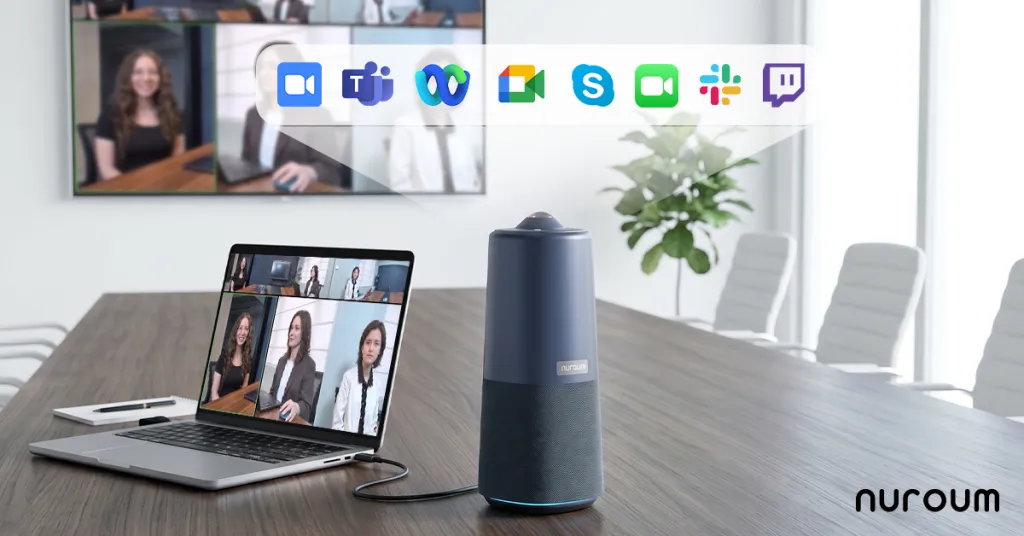
These three shifts — USB ubiquity, DSP advancement, and platform standardization — converged to make the all-in-one conference camera not just possible, but superior to a fragmented setup. When one device handles video, audio, and processing, there is no compatibility gap between the camera and the microphone. There is no firmware mismatch between the speaker and the USB hub. There is a single cable to connect, a single device to recognize, and a single point of responsibility when something goes wrong.
The economic drivers reinforce the technological ones. Organizations are rationalizing their real estate footprints, which means meeting rooms need to be more flexible. A room that can switch from a brainstorming session to a client presentation to a hybrid team standup without reconfiguring hardware is inherently more valuable. All-in-one devices enable that flexibility: plug in one USB cable, select one device in your meeting app, and the room works regardless of format or platform.
This is why consolidation is not a trend — it is the logical endpoint of decades of engineering progress. The question facing most organizations is not whether to consolidate, but which path to take given their current equipment, room sizes, and platforms.
Trade-off Matrix: Fragmented vs All-in-One Conference Room Setups
Most comparisons between fragmented and all-in-one conference room equipment focus on the obvious dimensions: cost, audio quality, video quality. These comparisons often miss the dimensions that actually determine whether a meeting room works or fails in daily practice. Here is a trade-off analysis across non-intuitive dimensions that matter more than spec sheets.
Meeting Start Friction
In a fragmented setup, starting a meeting requires a sequence of checks: Is the webcam connected and recognized? Is the speakerphone paired and powered? Is the correct microphone selected in the OS settings? Is the correct speaker selected in the meeting app? Each check is a potential failure point, and each failure point adds 30-90 seconds of troubleshooting.
An all-in-one device collapses this into a single action: plug in USB and select one device in the meeting app. The difference — typically 5-8 minutes per meeting in fragmented rooms versus under 30 seconds in consolidated rooms — compounds dramatically across a week of back-to-back meetings. Over a year, the time savings from eliminating meeting start friction alone can justify the cost of upgrading an entire floor of conference rooms.
IT Ticket Volume
Fragmented rooms generate support tickets for "camera not working," "no audio," "echo on the call," "can't share screen," and "adapter not recognized." Each ticket requires the IT team to diagnose which of the multiple devices is causing the problem — a process that often involves physically visiting the room and testing components one by one.
All-in-one rooms reduce the diagnostic surface to a single device. When something doesn't work, IT knows exactly which component to check. If the issue is hardware, swapping the device takes under a minute. This reduction in support complexity translates directly to lower IT overhead, faster resolution times, and fewer escalated tickets.
Device Failure Cascade
In a fragmented room, the failure of one device often renders the entire setup unusable. If the speakerphone battery dies mid-call, the meeting loses audio even though the camera and display are working perfectly. If the webcam cable is loose, remote participants lose video even though the audio connection is fine. These cascade failures are inherent to systems with single points of dependency dispersed across multiple independent devices.
An all-in-one device eliminates the cascade problem because audio, video, and processing live in the same enclosure. If the device fails, you know immediately and can swap it. There is no scenario where the camera works but the speaker doesn't because of a loose cable between two separate boxes.
Platform Migration Cost
This is perhaps the most overlooked dimension. Organizations change video conferencing platforms — moving from Webex to Teams, or from GoToMeeting to Zoom — more frequently than they change conference room hardware. In a fragmented setup built around platform-specific hardware (like a Cisco room kit), a platform migration means replacing the entire room system.
USB-based all-in-one devices are platform-agnostic by design. They work with any application that recognizes a standard USB camera and speaker. When you migrate platforms, the hardware stays. This decouples your hardware investment cycle from your software subscription cycle — a significant financial and operational advantage.
Room Flexibility
A fragmented room is typically configured for one type of meeting. The webcam's field of view determines where people can sit. The speakerphone's pickup pattern determines who needs to be close to the device. Changing the room layout means reconfiguring the equipment.
All-in-one devices with wide-angle or 360-degree coverage remove these constraints. Participants can sit anywhere in the room, the camera captures everyone, and the microphone array picks up voices from all directions. The room adapts to the meeting, not the other way around.
Summary Trade-off Matrix
| Dimension | Fragmented Setup | All-in-One Setup |
|---|---|---|
| Meeting start time | 5-10 minutes of troubleshooting | Under 30 seconds |
| IT support tickets | High (multiple failure points) | Low (single device to diagnose) |
| Device failure cascade | Common (one failure breaks the chain) | Eliminated (single integrated unit) |
| Platform migration cost | High (may require replacing hardware) | Low (USB standard works everywhere) |
| Room layout flexibility | Low (constrained by device placement) | High (wide-angle coverage adapts) |
| Setup complexity | 4-6 cables, multiple power sources | 1 USB cable, single power source |
| Upgrade path | Replace individual components | Replace one device |
Device-by-Device Upgrade Paths
Every conference room starts somewhere different. Some teams are still using a basic webcam and a standalone speakerphone. Others have invested in dedicated conference phones or video bars. This section maps the most common starting points to their corresponding all-in-one upgrade paths, with enough depth to help you identify which path matches your current situation.
From Speakerphones to All-in-One
Standalone Bluetooth and USB speakerphones were the dominant conference room audio solution for years. They solved a real problem — laptop speakers and built-in mics couldn't handle group calls — but they introduced their own frustrations: battery anxiety, Bluetooth pairing issues, and the fundamental limitation that audio is only half the meeting experience.
When you upgrade from a speakerphone to an all-in-one conference device, the single biggest change is the addition of intelligent video. Remote participants can see who is speaking, read body language, and follow visual cues — capabilities that a speakerphone alone cannot provide, no matter how good its audio quality. This shift from audio-only to full audio-video transforms the remote experience from "listening to a conference call" to "being in the room."
The upgrade also eliminates the connectivity friction that plagues Bluetooth speakerphones. Instead of pairing, unpairing, and managing battery life, you plug in one USB cable and the device is ready. For teams that rotate through meeting rooms frequently, this consistency alone justifies the upgrade — the experience is identical every time, regardless of who is hosting the meeting.
Depth preview: The decision of which all-in-one to choose depends heavily on room size and the types of meetings you run. Smaller huddle rooms have different requirements than boardrooms. For a complete guide to this transition from speakerphone to all-in-one — including room sizing, placement, and setup best practices — see our detailed article on upgrading from speakerphones to all-in-one conference devices.
From Webcams to Conference Cameras
The webcam-on-top-of-the-monitor setup is the most common starting point for conference rooms — and the most limiting. Standard webcams are designed for single users sitting 18-24 inches from the screen. Put them in a conference room where participants are spread across a 10-foot table, and the limitations become obvious: narrow field of view, poor low-light performance, and audio handled by the laptop's built-in mic array, which picks up keyboard clicks and room echo.
Moving from a webcam to a dedicated conference camera is about coverage and image quality. A conference camera with a wide-angle lens captures everyone at the table in a single frame. Higher-quality sensors maintain image clarity even in the uneven lighting typical of meeting rooms. And the built-in speaker and microphone array handle audio at a level that laptop hardware simply cannot match.
There is also a subtler benefit: professionalism. When remote participants — especially clients or executives — see a fisheye webcam view of a conference table with people crammed into the frame, it signals that the organization hasn't invested in its meeting infrastructure. A clean, wide-angle room view with clear audio communicates competence and preparation before anyone starts speaking.
Depth preview: The gap between a $50 webcam and a $500+ conference camera goes far beyond resolution numbers. Sensor quality, lens design, autofocus behavior, and field of view all matter differently depending on your room layout. Explore the full comparison in our guide on why conference cameras outperform business webcams for meeting rooms.
From Conference Mics and Phones to All-in-One
Dedicated conference microphone systems and VoIP conference phones represent a significant investment — and a significant limitation. Conference phones, in particular, are designed for audio-only meetings and typically cannot integrate with modern video conferencing platforms in a meaningful way. They are a legacy of the era when conference calls happened over phone lines, not over IP.
The upgrade from dedicated conference mics and phones to an all-in-one device adds video capability while maintaining or improving audio quality. Modern all-in-one devices use multiple microphone elements with beamforming technology to isolate individual speakers, providing audio clarity that rivals or exceeds dedicated conference phone systems. The difference is that the all-in-one device also delivers video, making it suitable for the hybrid meeting reality that conference phones were never designed to address.
For organizations still maintaining separate conference phone infrastructure — dedicated phone lines, PBX integration, dial-in numbers — the migration to an all-in-one USB device also means simplifying the technology stack. Instead of maintaining both a phone system and a video conferencing system, you consolidate to a single platform-agnostic device that works with whatever meeting platform you choose.
Depth preview: If your conference room still has a dedicated conference phone sitting in the middle of the table, you are paying for infrastructure that serves only one function. Learn how to consolidate in our article on replacing conference microphones and phones with modern all-in-one solutions.
The Video Bar Upgrade Path
Video bars — all-in-one devices that mount below or above a display — have become one of the most popular conference room equipment categories. They combine camera, speakers, and microphones into a single bar-shaped enclosure, typically with HDMI or USB connectivity. Early video bars solved the fragmentation problem for the first time, but the category has evolved significantly, and not all video bars offer the same capabilities.
When evaluating whether to upgrade your existing video bar or move to a different form factor, the key questions are: What is the field of view of the current bar? Does it have AI-powered framing and speaker tracking? What is the audio pickup range? Older video bars were designed for small huddle rooms — if your room has grown or your meeting formats have changed, a 90-degree field of view and 8-foot audio range may no longer be adequate.
Modern video bars and all-in-one conference cameras have added capabilities that go well beyond simply combining camera and speaker. AI-powered modes that automatically frame participants, switch between views based on who is speaking, and provide 360-degree coverage are now available at price points that were unimaginable even three years ago. The upgrade decision is about which of these capabilities matter for your specific meeting scenarios.
Depth preview: The video bar market is crowded and the differences between models are not always obvious from spec sheets. Our video bar upgrade guide walks through the evaluation criteria that matter most — and which ones are marketing noise.
Logitech Alternatives: Expanding Your Options
Logitech dominates the conference room equipment market with its MeetUp, Rally, and Rally Bar product lines. For many organizations, Logitech is the default choice — not because it was evaluated against alternatives, but because it's the brand IT teams recognize. This default position means that many teams are paying more for less capable hardware simply because they didn't explore the alternatives.
The all-in-one conference camera market has matured significantly, and there are now options that match or exceed Logitech's offerings on key dimensions — field of view, microphone pickup range, AI features, and total cost — while maintaining the same USB plug-and-play simplicity. The evaluation criteria that matter are the same regardless of brand: does the camera cover your room size? Does the audio pickup reach everyone at the table? Does it work with all your meeting platforms?
Depth preview: Breaking out of the default-choice pattern requires knowing what the alternatives actually offer. Our comparison of Logitech MeetUp and Rally alternatives covers capability comparisons, pricing context, and what to look for when evaluating options beyond the brand you already know.
Audio Brand Alternatives: Poly, Sennheiser, Konftel
Poly (formerly Polycom), Sennheiser, and Konftel are legacy audio brands that built their reputations on conference phones and speakerphones. As the market shifted toward integrated video solutions, each company has attempted to bridge the gap with video-capable products — but the results vary significantly in terms of video quality, ease of use, and platform compatibility.
The core challenge for audio-first brands entering the video market is that decades of expertise in acoustic engineering do not automatically translate to expertise in optics, image processing, and AI-powered camera features. A conference camera is not a speakerphone with a lens bolted on — the integration between audio and video processing, particularly in AI-powered speaker tracking and auto-framing, requires tight coupling that is difficult to achieve by adapting existing audio products.
For organizations currently using Poly, Sennheiser, or Konftel equipment and considering an upgrade, the decision comes down to whether you want to stay within a familiar brand ecosystem or prioritize the video capabilities that your hybrid meetings actually require. Brand loyalty should not override functional requirements — especially when the functional requirements have shifted dramatically from audio-only to fully integrated audio-video.
Depth preview: Understanding the full landscape of options beyond the audio-first brands can reveal significant capability gaps. Our guide to Poly, Sennheiser, and Konftel alternatives covers what to look for when video quality is as important as audio quality in your meeting rooms.
UC Platform and Room Kit Alternatives: Cisco, RingCentral, and More
Cisco room kits, RingCentral Rooms, and similar platform-specific hardware represent the most expensive and most restrictive path to conference room equipment. These systems are designed to work optimally with a single platform — Cisco hardware for Webex, RingCentral hardware for RingCentral — and while they provide a polished experience within that ecosystem, they create significant costs and constraints everywhere else.
The primary constraint is platform lock-in. A Cisco Room Kit cannot run Zoom Rooms natively. If your organization decides to migrate video conferencing platforms — a decision that is increasingly common as pricing, features, and organizational preferences shift — your conference room hardware becomes stranded capital. You either accept a degraded experience running a different app on hardware optimized for another platform, or you replace the room systems entirely.
USB-based all-in-one devices sidestep this problem entirely. They present themselves as standard USB peripherals, which means they work identically with every platform. The hardware investment is decoupled from the software decision. For organizations that value flexibility, this architecture is fundamentally more resilient than platform-specific room kits.
The second constraint is cost. Platform-specific room kits typically include licensing fees, maintenance contracts, and dedicated compute modules — costs that recur annually and compound across multiple rooms. USB-based alternatives eliminate these recurring costs because the "compute" is the laptop you already plug in, and there are no platform licensing fees for the hardware itself.
Depth preview: The total cost of ownership difference between platform-specific room kits and platform-agnostic alternatives can be substantial over a 3-5 year horizon. Our comparison of Cisco, RingCentral, and LifeSize alternatives breaks down the economics and the experience trade-offs.
Decision Framework: Which Upgrade Path Is Right for You
With multiple upgrade paths available, the key is matching your current situation to the right path without over-investing or under-specifying. This framework walks through the evaluation steps in order.
Step 1: Audit Your Current Equipment
Before evaluating any upgrade, document exactly what each conference room currently has. For each room, note:
- Camera: make, model, field of view, connection type (USB, HDMI, proprietary)
- Audio: speakerphone, conference phone, or built-in display speakers; pickup range
- Microphone: built-in, external, or array; pickup pattern and range
- Connectivity: how devices connect to each other and to the user's laptop
- Platform: which video conferencing platforms are used in that room
This audit reveals patterns. You may discover that half your rooms are already heavily fragmented (4+ separate devices), that certain rooms generate the most IT tickets, or that audio quality is the consistent complaint across rooms — not video. The upgrade path should address the problems the audit reveals, not the problems a vendor's marketing team has decided are important.
Step 2: Assess Room Size and Layout
Room size is the single most important constraint on equipment selection. A device that performs beautifully in a 4-person huddle room will be inadequate in a 12-person boardroom. Key metrics:
- Small rooms (2-4 people): A device with 90-120-degree field of view and 10-foot audio pickup range is usually sufficient. Most video bars and compact all-in-one cameras work here.
- Medium rooms (5-8 people): Look for 120-degree or wider field of view and at least 15-foot audio pickup range. AI-powered speaker tracking becomes valuable at this scale.
- Large rooms (9+ people): 360-degree coverage or very wide field of view, extended audio pickup range (15-20+ feet), and speaker tracking are essential. Consider devices with 360-degree panoramic capability.
Room layout matters too. A long narrow room has different coverage requirements than a square room. Glass walls reflect sound and create acoustic challenges that matter for microphone performance. The position of the display relative to seating determines where the camera should be mounted and what field of view is needed.
Step 3: Evaluate Platform Flexibility Needs
This step is about future-proofing. Ask two questions:
- How likely is your organization to change video conferencing platforms in the next 3-5 years?
- Do different teams within your organization use different platforms?
If the answer to either question suggests multi-platform usage, prioritize USB-based, platform-agnostic devices. The cost of platform-specific hardware becomes a liability when platform requirements change — and in the current UC market, platform requirements change more often than most organizations expect.
Step 4: Calculate Total Cost of Ownership
The purchase price of conference room equipment is only one component of total cost. A complete TCO model includes:
- Hardware cost: The upfront price of the device or devices
- Installation cost: Professional installation for ceiling-mounted or complex systems; near-zero for USB plug-and-play devices
- IT support cost: The labor cost of troubleshooting, repairing, and replacing equipment, measured in help desk hours per room per year
- Platform licensing: Recurring fees for platform-specific room kits
- Replacement cycle: How often equipment needs to be replaced (3-5 years for quality equipment)
- Meeting downtime cost: The value of time lost to equipment-related meeting delays
For many organizations, the IT support cost and meeting downtime cost dominate the TCO calculation — and these are precisely the costs that all-in-one devices reduce most dramatically. A device that costs more upfront but eliminates 90% of room-related support tickets may have a lower TCO than a cheaper device that generates constant IT overhead.
Step 5: Choose Your Path and Validate
Based on the audit, room assessment, platform analysis, and TCO calculation, identify which of the upgrade paths from the previous section matches your situation. Most organizations will find that different rooms need different paths — a huddle room starting from a speakerphone needs a different approach than a boardroom with legacy Cisco hardware.
Before committing to a full deployment, validate with a pilot room. Install the chosen device in your most problematic conference room and measure the results: meeting start time, IT ticket volume, user satisfaction, remote participant feedback. A successful pilot generates the internal buy-in needed for broader deployment.
For additional guidance on specific room scenarios, Nuroum's small room solutions page provides room-specific recommendations, and the conference camera category page lets you compare options across different room sizes and requirements.
The Nuroum 360 Pro: One Device That Replaces Them All
After mapping the landscape of conference room equipment upgrades — the problem of fragmentation, the case for consolidation, the trade-offs, and the upgrade paths — the question becomes: is there a single device that delivers on the all-in-one promise across a range of room sizes and meeting types?
The Nuroum 360 Pro is designed to answer that question.
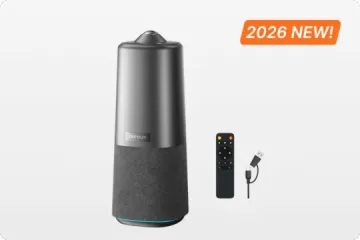
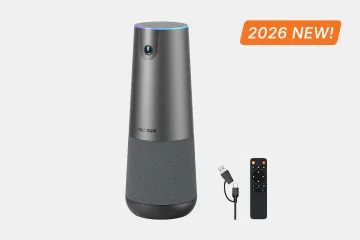
This all-in-one video conference camera consolidates the functions of a webcam, speakerphone, microphone array, and AI processing unit into a single USB plug-and-play device. It is built around a 360-degree 1080P fish-eye lens that captures panoramic video at 1080P at 30 frames per second — eliminating the "who's off camera?" problem that plagues narrow-field-of-view cameras.
Audio is handled by six omnidirectional noise-canceling microphones with a pickup range of up to 16 feet (6 meters), paired with a Hi-Fi speaker and a full-duplex audio system. The full-duplex capability means participants can speak and be heard simultaneously — no more cutting out when two people talk at once, a common frustration with half-duplex speakerphones. The noise-canceling technology actively suppresses background sounds and minimizes echoes, so the clatter of a keyboard or the hum of an HVAC system doesn't become part of the meeting audio.
What sets the Nuroum 360 Pro apart is its three AI-powered capture modes, each optimized for a different meeting format:
Discussion Mode intelligently detects and highlights up to three active participants in close-up frames. This is ideal for collaborative meetings where conversation flows naturally between participants — remote attendees see who is speaking in a dynamic, TV-broadcast-style layout rather than a static wide shot of the entire room.
Global Mode provides a 115-degree field of view without any adjustment, optimized for presentations where the focus is on a single presenter or a whiteboard. The wide but directed coverage keeps the presenter centered and visible without the distortion that can occur at the edges of a full 360-degree view.
Presentation Mode identifies the active speaker and automatically frames them, switching focus as different people begin speaking. This mode works best for structured meetings with designated speakers — all-hands presentations, client pitches, or training sessions where one person leads most of the conversation.
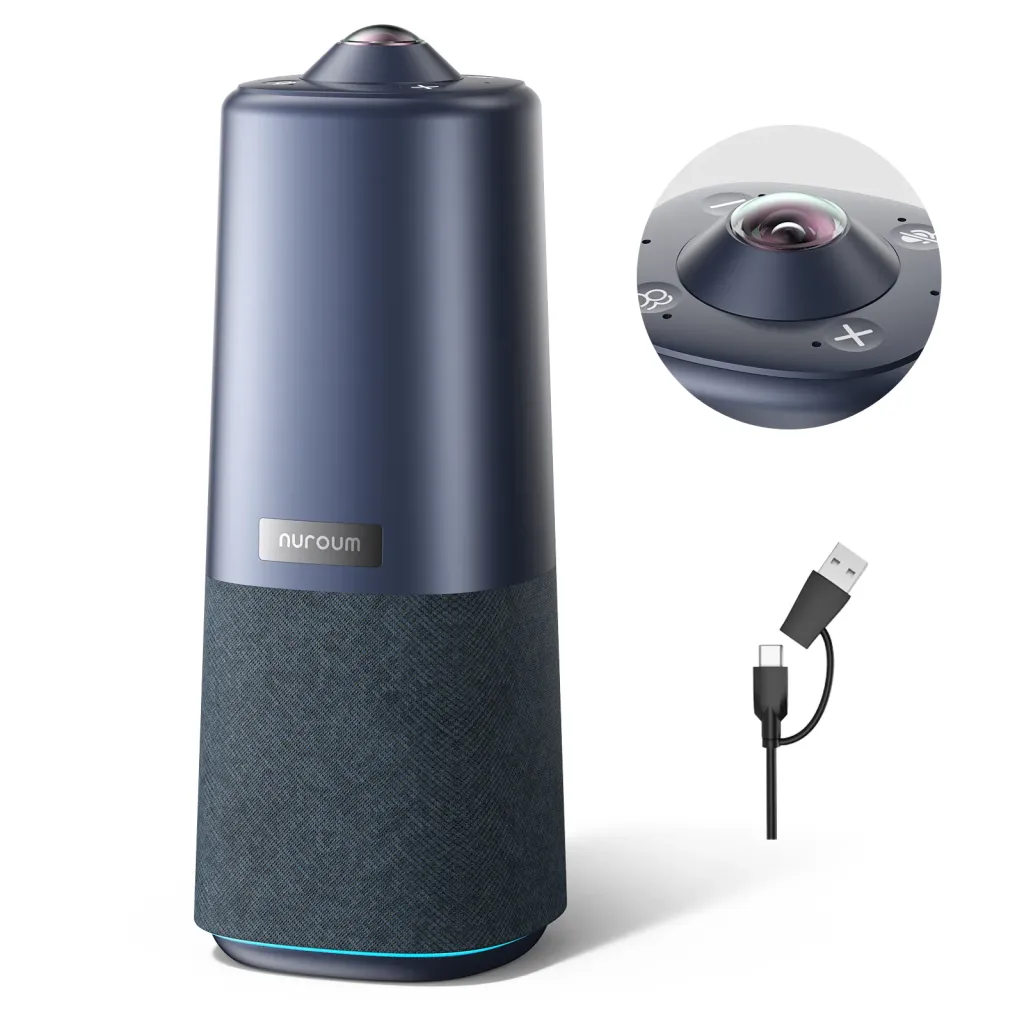
Physically, the device includes a standard 1/4-inch tripod mount for flexible positioning, top-mounted control buttons for quick adjustments without reaching for a laptop, and a remote control for managing meetings from across the room. The privacy controls are immediate and unambiguous: you can turn off the camera and mute the microphones instantly — there is no ambiguity about whether you are on or off.
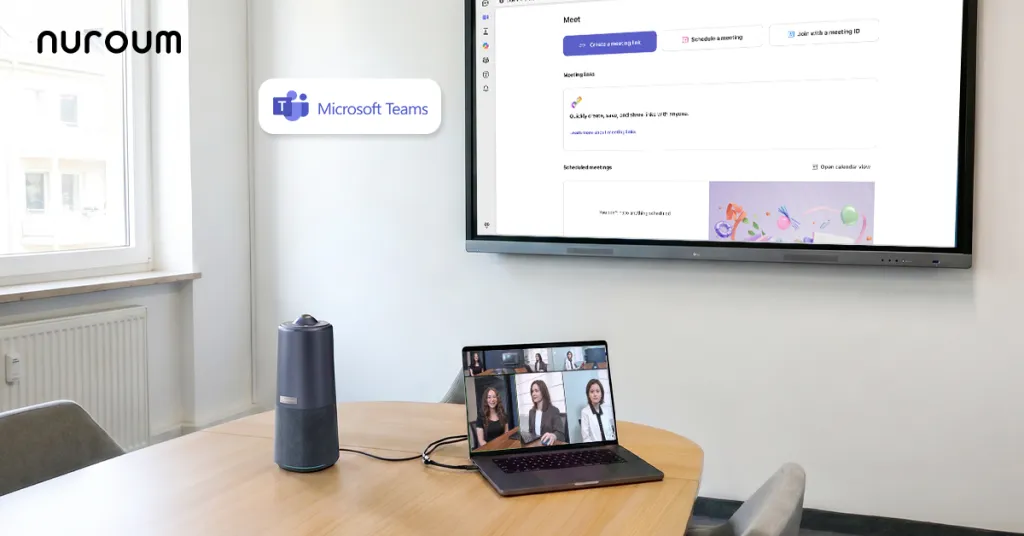
Setup requires no drivers, no software installation, and no IT configuration. A single USB cable and power adapter connect the device to any PC, desktop, or laptop running Windows, macOS, or Linux. It is recognized as a standard USB camera and speakerphone by Zoom, Microsoft Teams, Google Meet, GoToMeeting, Webex, and any other application that supports USB video and audio devices.
At $630.00 (reduced from $699.99), the Nuroum 360 Pro occupies a price point that makes it accessible for organizations equipping multiple rooms while delivering capabilities — 360-degree video, six-microphone array, AI-powered multi-mode capture — that previously required significantly more expensive, multi-device setups.
For a complete product overview, visit the Nuroum 360 Pro product page. For rooms with different size or layout requirements, the best video conferencing solutions for large rooms article covers options for spaces that need extended coverage.
Frequently Asked Questions
What is the main problem with using separate devices in a conference room?
Separate devices create compatibility conflicts, cable clutter, and higher IT support overhead. Each device has its own drivers, firmware, and failure modes, which multiplies the points of failure and makes meeting start-up a frustrating experience.
How do I decide whether to upgrade my conference room equipment?
Evaluate your current setup against four criteria: how much meeting time is lost to equipment issues each week, how many IT support tickets your meeting rooms generate, whether your current setup covers your room size adequately, and whether your equipment is platform-agnostic or locked into one vendor.
What is an all-in-one conference camera and how is it different from a webcam?
An all-in-one conference camera combines a wide-angle camera, speaker, and microphone array into a single USB device designed for meeting rooms. Unlike a standard webcam, it captures a wider field of view, picks up audio from across the room, and eliminates the need for separate speakerphones and external mics.
Will an all-in-one device work with my existing video conferencing platform?
Most USB-based all-in-one conference devices are platform-agnostic and work with Zoom, Microsoft Teams, Google Meet, Webex, GoToMeeting, and other major platforms without additional drivers. This avoids the platform lock-in problem common with proprietary hardware from Cisco or Poly.
Is an all-in-one conference device suitable for large meeting rooms?
It depends on the specific device and room size. Many all-in-one devices perform best in small to medium rooms (up to 6-8 participants). For larger rooms, you may need a device with extended audio pickup range and wider camera coverage, or a solution that supports expansion with additional microphones.
Related Guides
For a deeper dive into each upgrade path and alternative comparison discussed in this article, explore these detailed guides:
- Upgrading from Speakerphones to All-in-One Conference Devices — A complete walkthrough of transitioning from standalone speakerphones to integrated all-in-one solutions, covering room sizing, placement, setup, and the experience difference for remote participants.
- Conference Camera vs Business Webcam: Why the Difference Matters — A detailed comparison of sensor quality, field of view, audio integration, and real-world meeting performance between standard webcams and purpose-built conference cameras.
- Replacing Conference Microphones and Phones with All-in-One Solutions — How to migrate from legacy conference phone systems and dedicated microphone arrays to modern USB devices that handle both audio and video.
- Video Bar Upgrade Guide: Choosing the Right All-in-One for Your Room — Evaluation criteria for upgrading or replacing existing video bars, including field of view, AI features, audio range, and platform compatibility.
- Logitech MeetUp and Rally Alternatives Worth Considering — A comparison of all-in-one conference cameras that compete with Logitech's popular product lines across capability, coverage, and value.
- Poly, Sennheiser, and Konftel Alternatives for Conference Rooms — What to look for when evaluating options beyond audio-first brands, with a focus on video quality and integrated AI features.
- Cisco, RingCentral, and LifeSize Alternatives: Breaking Free from Platform Lock-In — A total cost of ownership comparison between platform-specific room kits and USB-based, platform-agnostic alternatives.