














The Hidden Inefficiency Sitting on Your Conference Table
Walk into most conference rooms built before 2020, and you'll find the same artifact: a speakerphone. It sits in the center of the table, its perforated grille collecting dust, its LED display showing the time in a timezone nobody asked for. For decades, this device was the summit of meeting room technology. It made conference calls possible. It was enough.
Then hybrid work happened.
Now half your team joins from the office while the other half dials in from home offices, co-working spaces, and airport lounges. The speakerphone still carries audio — sometimes impressively well — but it leaves remote participants blind. They cannot see who is speaking. They miss the whiteboard sketches, the hand gestures, the subtle nods that signal agreement. Every meeting becomes a partial experience for them, and over time, that partial experience compounds into disengagement.
The frustration runs deeper than most IT managers initially recognize. Remote participants in speakerphone-only meetings report feeling like second-class citizens — present in audio but absent from the conversation's full context. In-room participants, meanwhile, struggle to include their remote colleagues naturally because there is no shared visual space. The meeting fractures into two separate experiences stitched together by audio alone.
This article examines why the standalone speakerphone era is ending, what replaces it, and how to make the transition without overspending or overcomplicating your setup. Whether you want to replace a webcam and speakerphone combo with a single device or upgrade from a speakerphone to video, the decision framework is the same: match the device to your room, your meetings, and your team's collaboration style.
Why the Speakerphone Dominated for So Long
To understand the shift, start with why speakerphones succeeded in the first place. They solved a genuine problem: how to let multiple people in a room participate in a phone call simultaneously. Before speakerphones, someone held a phone to their ear while others shouted toward it. The speakerphone democratized audio conferencing.
Several factors kept speakerphones entrenched even as video conferencing matured:
Audio fidelity expectations were lower. Businesses accepted that conference calls sounded "like conference calls" — slightly hollow, occasionally echoey, with the characteristic delay of speaker-to-microphone feedback loops. This acceptance became a complacency trap.
Video conferencing requires infrastructure. Early systems needed dedicated codecs, specialized networks, and IT expertise to configure. A speakerphone needed a phone line. The barrier to entry was incomparably lower.
The use case was narrower. Conference calls were primarily for status updates, routine check-ins, and brief decisions. Nobody expected a speakerphone to power a workshop or client presentation. As meetings grew more complex and collaborative, the speakerphone's limitations expanded from acceptable to problematic.
Procurement cycles are slow. Most organizations refresh conference room equipment every 5-7 years. A speakerphone purchased in 2018 might still be "working" in 2026 even though it predates the hybrid work transformation. The device functions; the context around it has changed entirely.
The All-in-One Alternative: What It Actually Does Differently
An all-in-one conference camera combines video capture, microphone arrays, and speakers into a single device. The concept sounds simple, but the implications for meeting quality and IT management are substantial.
Unified Audio-Video Synchronization
When your camera, microphones, and speakers are designed as an integrated system, audio-video synchronization becomes a solved problem rather than a configuration challenge. Separate devices — even high-quality ones from reputable brands — can introduce lip-sync issues that subtly erode meeting quality. Remote participants notice when a speaker's mouth moves half a second before their words arrive. The disconnect is small but cognitively taxing.
Designed for Room Acoustics
Speakerphones were optimized for voice pickup in relatively controlled environments. All-in-one conference cameras are engineered for the acoustic realities of modern offices: glass walls that reflect sound, open floor plans that leak ambient noise, and the unpredictable acoustics of rooms that were never designed for video conferencing. Advanced models use beamforming microphone arrays that focus on human voices while suppressing keyboard clicks, HVAC rumble, and side conversations.
AI-Powered Meeting Intelligence
This is where the divergence becomes most pronounced. Modern all-in-one cameras include AI capabilities that no speakerphone can match:
- Auto-framing detects participants and adjusts the view to include everyone, eliminating the awkward "can you move the camera?" interruptions
- Speaker tracking identifies who is speaking and frames them appropriately, giving remote participants the same visual focus that in-room attendees enjoy
- Discussion mode highlights multiple active participants in split-screen views, preserving the conversational dynamic that flat, wide-angle shots destroy
- Noise suppression learns to distinguish speech from background sounds, a capability that improves as the AI processes more audio in your specific environment
The Simplicity Dividend
IT teams consistently underestimate the administrative cost of managing separate audio and video devices. Each device has its own firmware update cycle, compatibility matrix, and failure mode. An all-in-one device reduces management overhead proportionally. One cable instead of three. One device to troubleshoot when something goes wrong. One vendor relationship instead of two or three.
The Trade-Off Matrix: When to Upgrade vs. When to Wait
The speakerphone-to-camera transition is not universally urgent. Different organizations face different pressures, and a blanket recommendation to upgrade every room tomorrow is irresponsible. Here is a decision framework based on actual usage patterns:
Upgrade Now If:
- Remote participants regularly report difficulty following conversations. This is the clearest signal. When your hybrid meetings generate "sorry, can you repeat that?" or "who just said that?" multiple times per session, the speakerphone has become a productivity bottleneck.
- You manage multiple rooms with different equipment combinations. The inconsistency creates support overhead and user confusion. Standardizing on all-in-one devices simplifies both.
- Your team uses visual collaboration tools. If your meetings involve screen shares, whiteboards, document reviews, or presentations, audio-only participation is inherently limiting for remote attendees.
- You are outfitting a new space or undergoing a refresh. The incremental cost of an all-in-one device versus a premium speakerphone is often smaller than expected, and the installation is no more complex.
Wait If:
- The room serves audio-only purposes. Some spaces exist purely for phone calls — no screens, no presentations, no remote participants who need to see anything. A speakerphone is genuinely sufficient here.
- Budget constraints are severe, and the current device works. A functional speakerphone in a rarely-used room is not an emergency. Prioritize high-traffic spaces first.
- Your organization has not standardized on a video conferencing platform. Platform uncertainty creates risk for any hardware investment. Resolve the software question before committing to hardware.
The Hybrid Middle Ground
Some organizations adopt a staged approach: keep the speakerphone in smaller huddle spaces where quick audio calls dominate, and install all-in-one cameras in primary conference rooms where hybrid meetings happen regularly. This approach defers some cost while addressing the most painful gaps first. Just recognize it as a transitional state, not a permanent architecture.
What the Decision Actually Depends On
Most buying guides bombard you with specifications. What matters more is understanding which specifications correlate with your actual use case. Here is how to think about the decision:
Room Size vs. Device Capability
A common mistake is buying an all-in-one camera designed for large boardrooms and installing it in a huddle room, or vice versa. Match the device's pickup range and field of view to your actual space:
- Huddle rooms (2-6 people, under 200 sq ft): Prioritize wide-angle lenses (120°+) and moderate pickup range (10-12 feet). The device sits close to participants; the challenge is capturing everyone without distortion.
- Standard conference rooms (6-12 people, 200-400 sq ft): Look for 360° panoramic capture or intelligent auto-framing with 15+ foot pickup. Participants sit at varying distances and angles.
- Large conference rooms (12+ people, 400+ sq ft): Most all-in-one devices reach their limits here. Consider whether a single device suffices or if you need extension microphones and companion cameras.
Meeting Type vs. Feature Priority
Different meetings stress different capabilities:
- Status updates and check-ins: Basic auto-framing and clear audio suffice. AI features add marginal value.
- Client presentations and pitches: Video quality and professional framing matter. You want remote clients to see your team clearly and feel visually included.
- Workshops and brainstorming: Discussion modes that highlight multiple speakers are essential. The dynamic, rapid-turn nature of creative sessions demands intelligent camera behavior.
- Training and onboarding: Recording quality and screen integration matter more than real-time AI features.
Platform Integration Reality
Most all-in-one conference cameras claim "works with Zoom, Teams, and Google Meet." This is technically true at a basic level — they appear as USB audio and video devices. However, deeper integration varies. Certified devices for specific platforms may offer one-touch join, calendar integration, and platform-specific optimizations. If your organization is heavily committed to one platform, prioritize devices certified for that ecosystem.
The Migration Path: How to Actually Make the Switch
Replacing speakerphones with all-in-one cameras is technically straightforward but organizationally nuanced. Here is a practical sequence:
Phase 1: Audit Your Current State
Document every speakerphone in your inventory: location, age, usage frequency, and user complaints. This audit reveals which rooms cause the most friction and should be prioritized. It also identifies rooms where the speakerphone is genuinely adequate and can remain.
Phase 2: Pilot in One High-Pain Room
Choose a room where speakerphone limitations are most acute — typically your most-used conference room with the most hybrid meeting activity. Install an all-in-one camera, train a few power users, and collect feedback for 2-4 weeks. This pilot generates real evidence for your business case and surfaces any unexpected integration issues.
Phase 3: Standardize and Scale
Use the pilot learnings to select a standard device for your environment. Standardization reduces IT support burden and creates consistency for users who move between rooms. Roll out in phases: high-traffic rooms first, then medium-use spaces, then rarely-used rooms if budget allows.
Phase 4: Train and Iterate
New hardware without training creates frustration. Brief users on basic operations: joining a meeting, adjusting volume, muting, and understanding what the camera can see. Collect ongoing feedback and refine your setup based on actual usage patterns rather than assumptions.
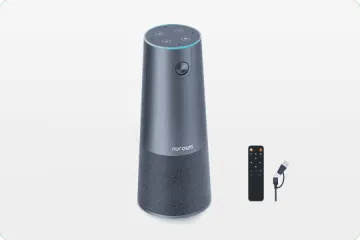
Capability Expression: Where the Nuroum 360 Pro Fits
The Nuroum 360 Pro is an all-in-one conference camera designed for the specific transition this article describes. Its relevance depends on your situation:
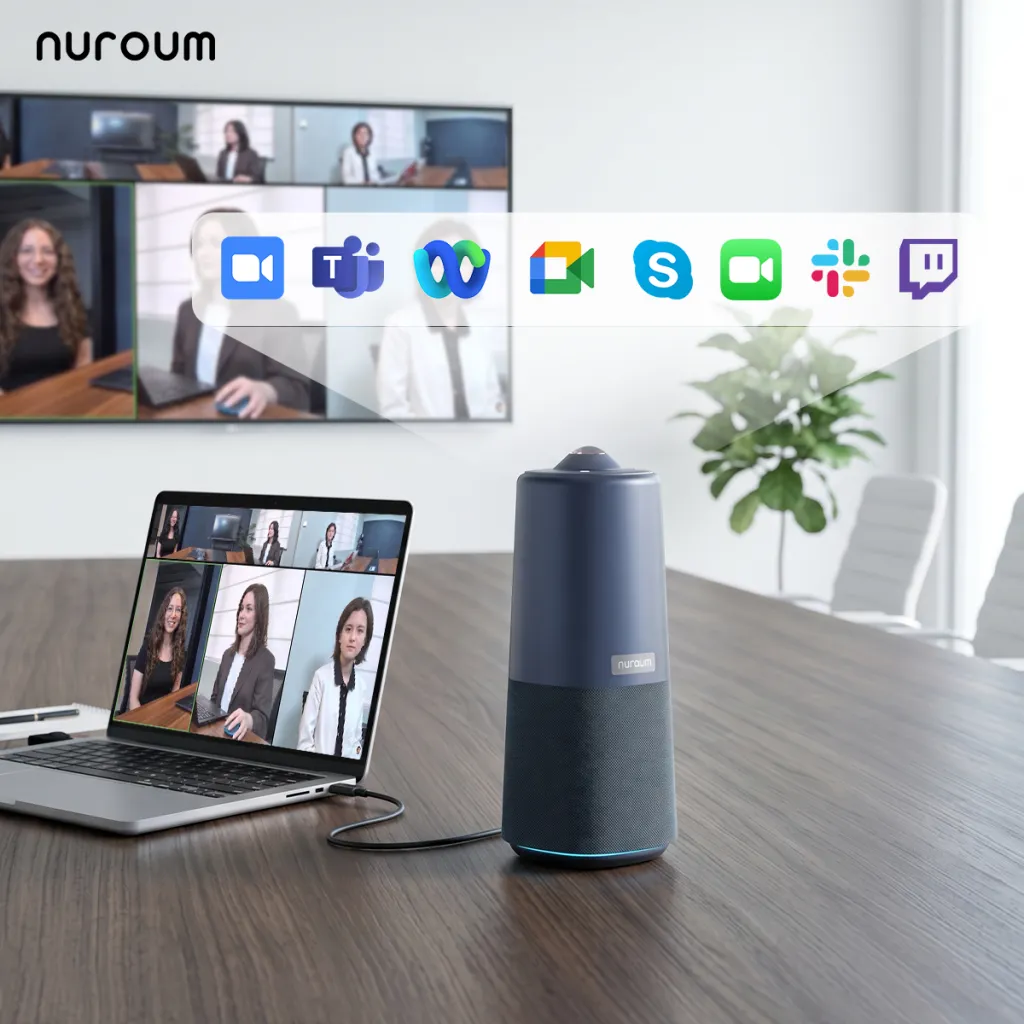
If your organization is moving from speakerphones to video and needs a device that covers standard conference rooms (6-12 people) without complex installation, the 360 Pro's 360° panoramic lens captures the entire room from a single position on the table. Six omnidirectional microphones with a 16-foot pickup range handle the audio side for most standard conference spaces. The integrated Hi-Fi speaker replaces your existing speakerphone's output function. USB plug-and-play connection means your IT team does not configure drivers or manage network settings.
The three AI capture modes address different meeting styles: Discussion Mode highlights up to three active participants in close-up views for dynamic conversations. Global Mode captures the 115° field of view for presentations where one person dominates. Presentation Mode identifies and tracks the active speaker automatically, eliminating manual camera adjustments mid-meeting.
For organizations managing multiple rooms, the 360 Pro's compatibility across Zoom, Microsoft Teams, Google Meet, and other major platforms means you can standardize on one device regardless of which platform different teams prefer.
FAQs
Q: Is a speakerphone still sufficient for modern hybrid meetings?
A: For audio-only calls, a speakerphone remains functional. However, hybrid meetings where some participants join remotely benefit significantly from video. Remote attendees can see facial expressions, read body language, and follow visual cues that pure audio cannot convey. If your team regularly includes remote participants, a speakerphone alone creates an uneven experience.
Q: What are the hidden costs of keeping a separate speakerphone and webcam?
A: Beyond the obvious equipment duplication, separate devices create cable management challenges, compatibility issues between brands, multiple points of failure, and IT support overhead. Each device may require separate drivers, firmware updates, and troubleshooting. The time your IT team spends managing multiple devices often exceeds the cost difference of a single all-in-one unit.
Q: How does audio pickup range compare between speakerphones and all-in-one cameras?
A: Premium speakerphones typically offer 8-12 foot pickup ranges, with some enterprise models reaching 18 feet. All-in-one conference cameras vary more widely depending on their microphone array design — from compact units with 6-foot pickup to advanced models with 8 omnidirectional microphones capturing audio from over 16 feet away. Always match the pickup range to your room size rather than assuming bigger is better.
Q: Can I replace a Polycom or Cisco speakerphone with an all-in-one camera?
A: Yes. Most all-in-one conference cameras connect via USB and work with the same platforms your legacy speakerphone supported — Zoom, Microsoft Teams, Google Meet, and others. The transition typically involves unplugging the old speakerphone and connecting the new device. Modern all-in-one cameras are designed for plug-and-play operation without complex configuration.
Q: What should I look for when upgrading from a speakerphone to a video conference camera?
A: Prioritize: (1) microphone array configuration and pickup range that matches your room size, (2) field of view that captures all participants at your table, (3) AI-powered features like auto-framing and speaker tracking, (4) platform compatibility with your video conferencing software, (5) ease of setup and ongoing management, and (6) total cost including any required accessories or subscriptions.
The Deeper Question: What Are You Actually Optimizing For?
The speakerphone-to-camera decision is ultimately a question about how your organization views meetings. If meetings are administrative overhead — necessary check-ins to maintain coordination — then audio-only participation feels acceptable. If meetings are strategic work sessions where decisions are made, relationships are built, and creativity happens, then the visual dimension is not a luxury. It is a requirement for equitable participation.
The businesses that hesitate on this upgrade often discover, upon honest examination, that their remote team members are not fully participating in meetings. They are listening. They are not collaborating. The speakerphone enables attendance; the all-in-one camera enables presence. Those are different things, and the gap between them is where hybrid work either succeeds or slowly fails.
Related Guides
- Best Webcam Alternative for Conference Rooms: Upgrade to an All-in-One Camera
- Conference Microphone vs All-in-One Camera: Which Setup Wins?
- Best Conference Phone Alternative: Modern Video-First Solutions
- Video Bar Alternative: Why Teams Are Upgrading to All-in-One Cameras
Upgrading your conference room? The Nuroum 360 Pro combines 360° video, 6 omnidirectional microphones, and integrated audio in a single USB plug-and-play device designed for hybrid teams.



