








































Think AI noise cancellation on Zoom or Teams means you can ditch your headset for the office for a cheap pair of earbuds? Think again.
This article breaks down why the AI era actually makes high-quality hardware more critical than ever. Exploring the tech truth behind audio distortion and cloud latency, we show how a professional business wireless headset acts as the ultimate "enabler" for your AI tools—skyrocketing meeting summary accuracy up to 98%+. Whether you need total isolation in a chaotic cubicle or all-day open-ear comfort for non-stop management calls, discover how upgrading your hardware is no longer just about audio quality, but about securing your professional edge in an AI-driven workforce.
1. Do We Really Need Headsets When AI Is So Smart?
Everyone is talking about how amazing AI is today. Zoom and Teams now have built-in AI that can block background noise and clear up your voice automatically. Because of this, many people think: "Why should I spend money on a business wireless headset? Can't I just use cheap $20 earbuds or my laptop's built-in microphone?"
It sounds perfect, but in reality, it doesn't work that way. We’ve all been there: you’re in an important meeting, the AI noise cancellation kicks in, and suddenly your boss sounds like they are underwater or breathing from a heavy space helmet.
There is a simple rule in technology: Garbage in, garbage out. No matter how smart an AI software is, it cannot fix a terrible, blurry sound recorded by bad hardware. If your microphone gives the AI a low-quality audio signal, the AI simply cannot do its job.

2. AI Software Can't Fix Bad Hardware
To understand why, we need to look at how AI actually handles your voice:
AI will "chop up" your voice: AI noise cancellation works by guessing and cutting out background sounds. If your microphone is cheap and noisy, the AI gets confused. While trying to delete the background noise, it will accidentally delete parts of your voice too. This is why you often sound robotic on calls. A good business headset gives the AI a clean, clear voice from the very start.
The lag and silence problem: AI tools take time to process your voice because they send the data to the cloud. If you use a normal consumer Bluetooth headphone, this delay gets worse. You will experience annoying silences, or people will constantly interrupt each other by accident.
3. How a Good Headset Helps Your AI Tools Work Better
A professional headset is no longer just for listening; it actually makes your daily AI tools much more powerful:
Perfect meeting summaries: Many offices now use AI to write down meeting notes and summaries. According to Microsoft's official tech guide, Overview and configuration of voice and face enrollment - Microsoft Teams, the AI can only identify who is speaking if the hardware records a crystal-clear voice.
From 85% to 98%+ AI meeting assistants accuracy: Microsoft's tech tests show that while AI meeting assistants are capable of 98%+ accuracy, they need a pristine audio signal to get there. Using a low-quality laptop mic or cheap earbuds corrupts the sound wave, dragging AI accuracy down to around 85% and ruining business summaries. A professional headset preserves that 98%+ peak performance.
- Talking to AI directly: Gartner reports that 40% of business apps will feature AI agents by the end of 2026. As voice might becomes your primary way to command these AI tools, a high-quality microphone ensures your commands aren't misunderstood. Plus, a physical mute button is crucial to prevent AI from accidentally listening to your private office conversations.
4. The Physical and Professional Cost of Non-Business Headphones
AI might be smart, but it cannot save you from physical pain or a bad professional image:
Ear pain is a real problem: Consumer headphones are made for listening to music for 20 minutes, not for 4-hour back-to-back meetings. They squeeze your head too hard and make your ears hot and sweaty. Business headsets are designed to be ultra-lightweight with breathable leather so you can wear them all day without even feeling them.
The psychology of trust: According to the workspace study, Leading in a Hybrid World - Harvard Business Impact, bad audio and static noise online easily make remote teams feel disconnected and annoyed with each other. A clear, warm, and professional voice instantly makes clients trust you and see you as an expert.

5. Quick Guide: Choosing the Right Gear for Your Work
To make the best choice, you need to know what to look for. Here are some helpful standards for a great noise cancelling office headset:
| Key Standard | What to Look For | Why It Matters for Your Work & AI Tools |
|---|---|---|
| Dedicated Microphone Boom | A high-quality physical mic boom that extends close to your lips. | Captures your voice with far greater precision than any built-in laptop or standard earbud mic. |
| Professional ENC Technology | Advanced Environmental Noise Cancellation (ENC) capabilities. | Actively separates your actual voice from chaotic background noise, ensuring your clients and AI tools hear you perfectly. |
| Rock-solid Connection | A headset that features a dedicated 2.4GHz USB Dongle. | Utilizes a private wireless channel that is highly resistant to office interference, preventing sudden lag and dropouts during crucial meetings. |
| All-day Ergonomics | An ultra-lightweight design (ideally under 190g) with breathable materials. | Completely prevents ear fatigue, soreness, and headaches during long, back-to-back calling shifts. |
Once you know what to look for, simply match your headset to how you work every day:
For Open Offices & Noisy Cubicles: Ultimate Isolation
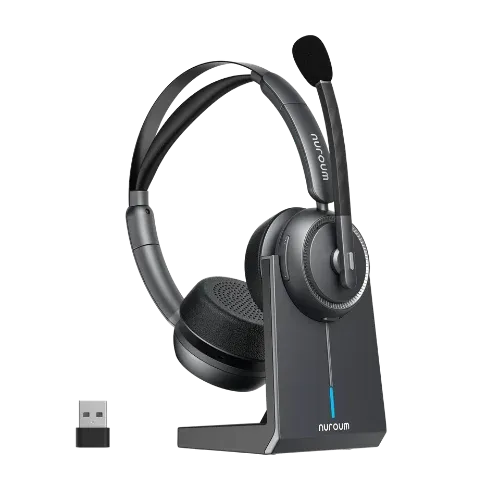
If you work in a bustling open office, your biggest enemy is unpredictable background noise ruining your AI transcriptions. Nuroum’s noise cancelling headphone with mic for office is engineered exactly for this:
Equipped with advanced ENC technology, this premium headset stops background chatter at the hardware level before it even reaches Zoom or Teams. Combined with a dedicated 2.4GHz USB Dongle for an instant, lag-free wireless connection, it guarantees your AI tools always receive a pristine audio signal, keeping your automated summaries 100% accurate.
For Managers & All-Day Callers: All-Day Comfort & Collaboration
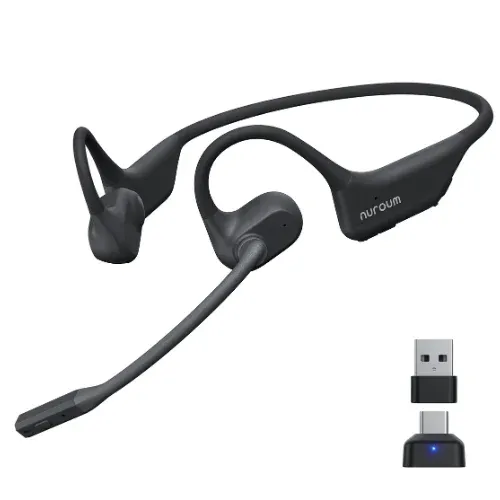
Being on back-to-back calls for 6 hours can make traditional ear cups hot, sweaty, and isolating. If you need to jump between online meetings and real-world team collaboration, Nuroum’s wireless open ear headphone offers the perfect balance:
Weighing an ultra-light 31g, its innovative "open-ear" design sits comfortably outside your ears, completely removing ear pressure and protecting your ear health. Despite its open architecture, it never compromises on professional standards: it comes fully equipped with premium ENC technology to isolate background distractions, and a dedicated 2.4GHz USB A/C Dongle to secure an instant, lag-free connection. This allows you to feed crystal-clear voice inputs to your AI tools all day long, without ever losing touch with your physical office environment.
6. Conclusion

AI did not make headsets useless—it actually made cheap, low-quality earbuds useless.
Buying a high-quality headset for the office is no longer just about buying an audio accessory. It is about buying the most important tool for working smoothly with both humans and AI. If you want to look and sound like a true professional in the AI era, you need to give your voice the right tool.
FAQs
1. Since Zoom and Teams have built-in AI noise cancellation, why do I still need a professional wireless headset for work?
Software AI cannot fix a poor hardware signal; it follows the "Garbage In, Garbage Out" rule. If your microphone records blurry audio, the AI often "chops up" your voice while trying to remove background noise, making you sound robotic or like you are underwater. A professional headset provides a clean, high-quality signal from the start, allowing the AI to work perfectly without distorting your voice.
2. Why does the article suggest it is best for wireless headsets to include a USB Dongle rather than relying on standard Bluetooth?
While standard Bluetooth is convenient, a 2.4GHz USB Dongle is generally the best choice for professional use because it provides a dedicated, high-speed channel that eliminates audio lag. This prevents the "clashing" effect where people accidentally interrupt each other due to latency. It also ensures a much more stable connection that won't drop or stutter during critical moments of a high-stakes meeting.
3. Can a high-quality headset really improve the accuracy of AI-generated meeting summaries?
Yes, significantly. AI tools require crystal-clear audio to distinguish between different speakers and accurately transcribe technical terms. Research shows that using a professional headset with AI-ENC microphones can boost transcription accuracy from around 85% to over 98%, ensuring your AI-generated business reports are reliable and professional.
4. Wearing headsets for back-to-back meetings causes ear pain, how do professional models help?
Unlike consumer earbuds meant for short-term use, professional headsets are designed for 8+ hours of wear. They use ultra-lightweight materials—often under 190g—and breathable leatherette to prevent heat buildup. Innovative designs, such as open-ear models, remove ear pressure entirely, protecting your hearing health while keeping you comfortable during long shifts.
5. Should I choose a different headset based on whether I work in a noisy office or a private space?
Absolutely. If you are in a noisy cubicle, you should prioritize "Mic Isolation" to block out nearby voices and keep your AI tools accurate. However, if you are a manager who needs to jump between online calls and real-world collaboration, an open-ear design is ideal as it allows you to stay connected to your physical office environment without sacrificing voice quality.