










































Bulk call center headset buying succeeds when you rank microphone intelligibility, adaptive noise cancellation, all-day comfort, and drop-in software compatibility above headline battery specs. A dual-ear wireless model with AI-powered ENC, multi-device connectivity, and a charging stand, such as the Nuroum HP31D, keeps per-seat total cost of ownership low while preserving call quality across every agent.
Key Takeaways
For open-plan floors, choose AI-powered ENC that suppresses up to 99.9% of background noise so callers hear voice, not keyboard clatter or HVAC hum.
Prioritize 30+ hours of talk time plus a charging stand so one charge survives a full shift without mid-day downtime.
Dual-ear stereo headsets cut distraction in dense rooms, while a mono variant is enough for quieter teams, so match ear style to seat type before ordering.
Standardize on one model with a USB dongle plus Bluetooth multipoint to lower IT support tickets across mixed Windows and Mac desks.
A sub-$100 per-seat AI-ENC headset can rival units costing two to three times more, sharply reducing total cost of ownership at scale.
Choosing a call center headset for a team of fifty or five hundred agents is not like buying one for yourself. A poor pick compounds across every seat, hurting caller clarity, agent comfort, and IT overhead. For procurement leaders, the right headset for call center deployment holds up through hundreds of hours of talk time while keeping total cost of ownership predictable.

Call Center Needs: What the Right Headset Must Solve
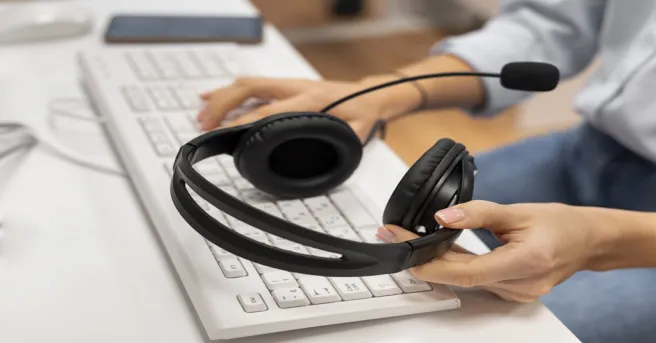
A call center headset is a revenue-critical tool, not a peripheral. Agents spend six to eight hours a day in conversation, so the device directly shapes three business outcomes: caller satisfaction, agent comfort and retention, and IT overhead. When evaluating options for bulk rollout, weigh performance under real floor conditions, not lab specifications. A dense room with dozens of simultaneous conversations is the true test; only a headset built for that environment keeps call quality consistent seat to seat (Figure 1).
5 Key Features to Evaluate in a Call Center Headset
Before choosing a call center headset with mic, focus on these five areas.
| Feature | What to Check | Why It Matters |
|---|---|---|
| Microphone & Noise Cancellation | Boom mic, ENC, DSP, echo suppression | Keeps conversations clear in noisy environments |
| Comfort & Durability | Cushions, headband, rotating parts | Supports long shifts and daily use |
| Connectivity | USB, Bluetooth, dongle, multipoint | Makes deployment easier across different devices |
| Battery & Charging | Talk time, charging options | Helps prevent downtime during shifts |
| Wired vs. Wireless | Mobility, reliability, security needs | Helps match the headset to your work environment |
1. Microphone & Noise Cancellation
Priority: Keep the agent's voice clear in a busy environment.
- Boom mic: Captures the voice closer to the mouth
- ENC / DSP: Reduces background conversations and keyboard noise
- Echo suppression: Helps prevent distracting echoes during calls
Quick check: Test the headset with multiple agents talking nearby—not just in a quiet office.

2. Comfort & Durability
Priority: Stay comfortable through long shifts and repeated daily use.
- Soft ear cushions: Reduce pressure during extended wear
- Padded headband: Improves all-day comfort
- Durable parts: Check hinges, boom arms, and connection points
Quick check: Have agents wear the headset for a full shift before bulk purchasing.
3. Connectivity
Priority: Make setup simple across your existing devices.
- USB: Easy plug-and-play connection
- Bluetooth + dongle: Adds wireless flexibility for PC users
- Multipoint: Lets users connect to two devices when needed
Quick check: Test compatibility with your PCs, softphones, CRM, Microsoft Teams, Zoom, and other platforms.
4. Battery & Charging
Priority: Avoid interruptions during working hours.
- 30+ hours talk time: Provides a useful buffer for full-day use
- Charging stand: Makes between-shift charging convenient
- Battery indicator: Helps agents monitor remaining power
Quick check: Make sure battery life covers the longest shift your team operates.
5. Wired vs. Wireless
Priority: Choose based on mobility, security, and workplace requirements.
| Wired | Wireless | |
|---|---|---|
| Mobility | Limited | High |
| Battery | Not required | Required |
| Setup | Simple | USB dongle / Bluetooth |
| Best for | Fixed desks | Flexible workspaces |
Quick takeaway: Wireless is generally more flexible for modern contact centers, while wired headsets remain useful where wireless devices are restricted or unnecessary.
Bulk Purchasing: Calculate Total Cost of Ownership
Once you've evaluated the headset itself, look beyond the purchase price.
A more useful calculation is: TCO = Purchase Cost + Replacements + Repairs + IT Support + Downtime
For a 500-seat deployment, even a small difference in failure rate or support requirements can have a significant financial impact.
A Practical Bulk Purchasing Strategy
1. Run a pilot: Test 10–15 units with different agents and working environments.
2. Test real noise: Include both quiet and noisy desks, paying particular attention to microphone and ENC performance.
3. Keep spare units: Consider ordering 10–15% more than your active seat count to cover new hires, repairs, and unexpected failures.
4. Negotiate volume terms: Ask about tiered pricing, warranty coverage, replacement terms, bulk shipping, and long-term product availability.
5. Standardize where possible: Using one primary headset model reduces procurement complexity and makes IT deployment and support easier.
The goal isn't to find the cheapest headset per box. It's to find the headset with the lowest cost per productive seat over its useful life.

Why the Nuroum HP31D Fits Bulk Deployment
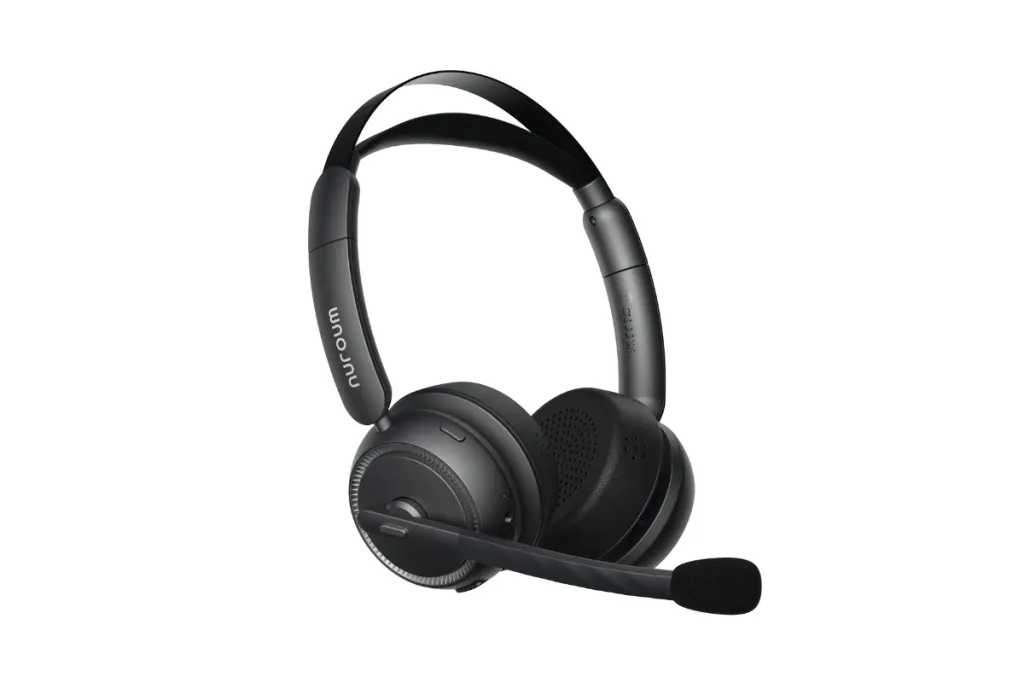
The Nuroum HP31D is designed to meet the key requirements of modern call centers: clear calls, all-day comfort, reliable connectivity, and minimal downtime.
It features AI-powered ENC, dual noise-cancelling microphones, and HiFi4 DSP for clearer voice pickup in busy environments. With up to 35 hours of talk time, a charging stand, and a comfortable design, it is built for long shifts and daily use. Bluetooth 5.4, multipoint, and a USB-A dongle also make deployment across different workstations more flexible.
For teams with different roles, the HP31D stereo and HP31S mono versions provide two wearing options while keeping the headset lineup standardized—making the HP31D family a practical choice for bulk call center deployment.

FAQs
- How many headsets should I order for a call center rollout?
Order ten to fifteen percent beyond your active seat count for spares, new hires, and units out for repair, so every agent stays on a working device during onboarding.
- Are wireless call center headsets reliable enough to replace wired ones?
Yes. Bluetooth 5.4 plus an included USB-A dongle gives low-latency, plug-and-play stability comparable to wired, with roughly 33 feet of freedom.
- What matters more for call clarity: the microphone or noise cancellation?
Both, in different ways. Microphone quality carries your voice clearly, while ENC removes the background before it reaches callers; on noisy floors, prioritize ENC with a noise-cancelling boom mic.
- Do these headsets work with Microsoft Teams and Zoom?
Most business headsets are broadly compatible with Teams, Zoom, and Webex across Windows, Mac, Linux, Android, and iOS. Confirm support against your stack before ordering.
- How long should a call center headset battery last for a full shift?
Aim for 30 or more hours of talk time with a charging stand, so a single charge covers back-to-back shifts without downtime.