










































The best wireless headset for sales calls depends on where you work.
Nuroum HP31D is the strongest value for desk-based calling, while OpenEar Pro 2 favors mobility and awareness. Jabra Evolve2 65 suits UC workflows, and Poly Voyager Focus 2 adds ANC for noisy offices. Prioritize microphone clarity before speaker features.
Key Takeaways
- Choose the HP31D for desk-based calling when up to 35 hours of talk time and a charging stand matter more than open-ear awareness.
- Choose the OpenEar Pro 2 when a 31 g fit and situational awareness matter more than noise isolation.
- For noisy offices, distinguish ANC, which helps you hear, from microphone noise reduction, which helps your caller hear you.
- If you switch between a computer and phone, prioritize two-device multipoint and consider a dedicated USB dongle for computer calls.
The right bluetooth headset for calling keeps your voice clear, stays comfortable through back-to-back conversations, and switches easily between your computer and phone.
What Makes a Good Headset for Sales Calls?
A sales headset should solve problems on both sides of the conversation:
Microphone clarity
Look for a boom microphone and noise reduction designed for speech. Speaker ANC helps you concentrate, but it does not clean up the audio your prospect hears.
Comfort
Lightweight designs reduce pressure. Open-ear and single-ear styles preserve awareness; dual-ear designs help you focus.
Battery and charging
Check rated talk time, not only music playback. A charging base makes daily top-ups easier.
Connectivity
Bluetooth suits phones and mobility. A USB dongle simplifies computer setup, while multipoint keeps two devices connected.
Value
Compare the complete package, including the dongle, charging stand, and required platform variant—not just the headline price.
What Are the Best Wireless Headsets for Sales Calls?
Nuroum HP31D: Best Overall Value for Desk-Based Calls
The Nuroum HP31D is the easiest recommendation for high-volume calling at a desk.
- Dual-ear design aids focus, while dual microphones.
- AI-powered ENC target background sound during calls.
- The 250° rotating boom supports flexible placement.
- You get up to 35 hours of talk time or 45 hours of music playback.
- Bluetooth 5.4, multipoint, a USB-A dongle, and wired USB-C cover mixed workflows.
- The included charging stand is especially useful between call blocks, making it an exceptional
wireless headset with mic for work
Nuroum OpenEar Pro 2: Best Lightweight Option for Mobile Sellers
The Nuroum OpenEar Pro 2 weighs only 31 g and leaves the ear canal open. That makes it a practical
- Dual microphones with ENC handle outgoing speech.
- Bluetooth 5.4 and multipoint support phone-and-computer workflows, and the USB-A/C dongle simplifies laptop setup.
- Battery life reaches 12 hours of talk time or 15 hours of music.
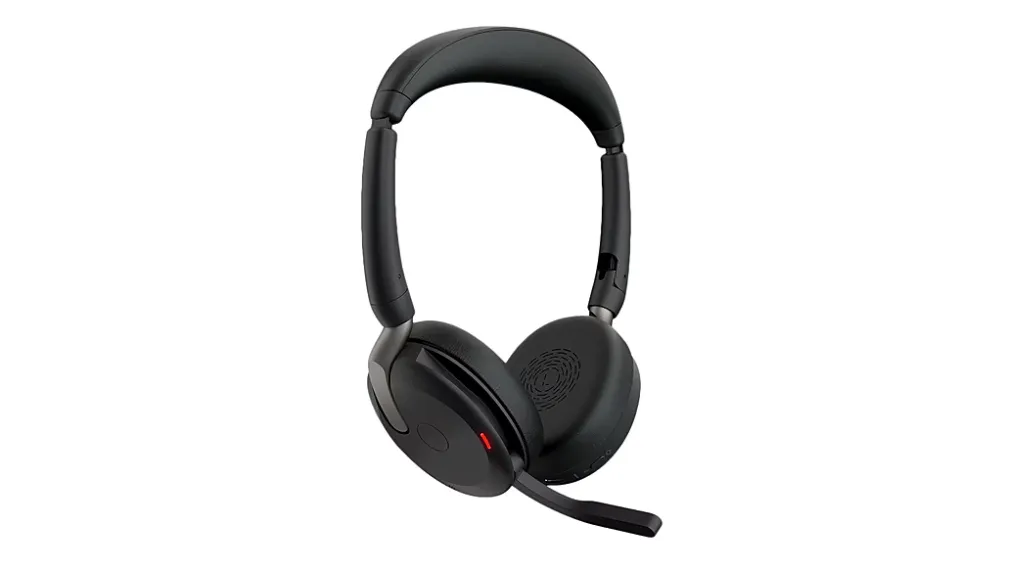
Jabra Evolve2 65: Best for Established UC Workflows
The Jabra Evolve2 65 combines three-microphone call technology with passive noise isolation and a visible busylight.
It supports two simultaneous Bluetooth connections and uses a USB adapter for computer calls. Ratings reach 35 hours of talk time with the busylight off and 37 hours of music playback. UC and Microsoft Teams variants are available.
Poly Voyager Focus 2: Best for Noisy Offices and Focus
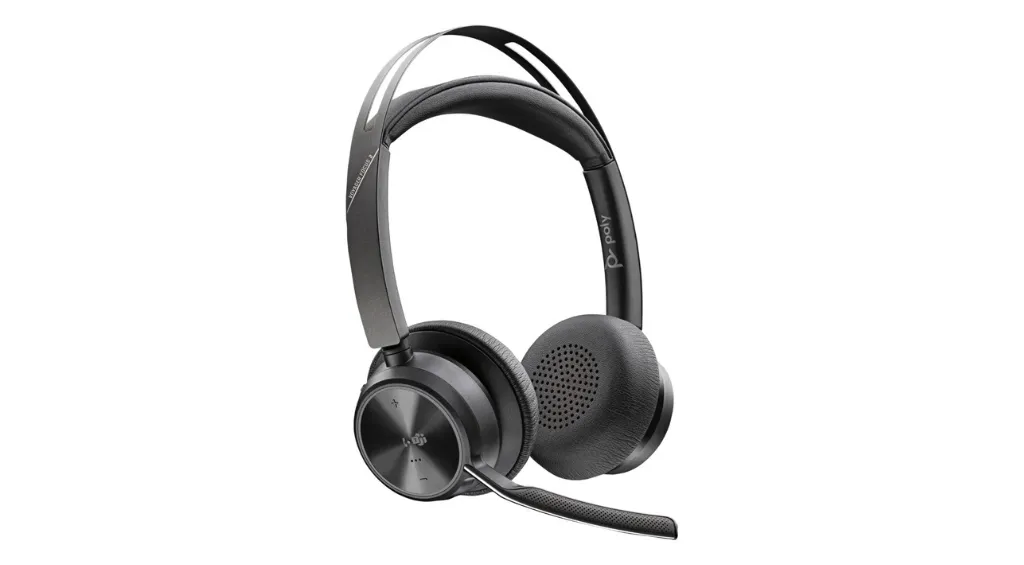
The Poly Voyager Focus 2 is the strongest fit here when surrounding noise distracts you.
It offers Bluetooth multipoint, a USB computer adapter, and corded operation. Talk time reaches 25 hours with ANC and the online indicator off, although that maximum requires a settings change through Poly Lens.
How Do the Top Headsets Compare?
| Headset | Wearing style | Microphone / focus features | Rated battery | Connectivity | Price context |
|---|---|---|---|---|---|
| Nuroum HP31D | Dual-ear | Dual-mic ENC; rotating boom | 35 h talk; 45 h music | Bluetooth 5.4, multipoint, USB-A dongle, USB-C | From $90 |
| Nuroum OpenEar Pro 2 | Open-ear | Dual-mic ENC; awareness-friendly fit | 12 h talk; 15 h music | Bluetooth 5.4, multipoint, USB-A/C dongle | From $129 |
| Jabra Evolve2 65 | Mono or stereo on-ear | Three-mic call technology; passive isolation | 35 h talk; 37 h music | Bluetooth, two-device connection, USB adapter | Varies by variant and bundle |
| Poly Voyager Focus 2 | Stereo on-ear | Acoustic Fence; hybrid ANC | Up to 25 h talk under specified settings | Bluetooth multipoint, USB adapter, corded mode | Varies by variant and bundle |
Battery figures are manufacturer maximums. Prices and bundles can change; check the linked product pages before buying.
For more role-specific options, see this best headset for calling roundup. Otherwise, use the steps below to validate your shortlist.
How to Choose a Bluetooth Headset for Calling
Record a realistic test call
Use your normal room, calling app, and speaking volume. Ask the listener whether keyboard noise, voices, or echo remain audible.
Match the fit to your environment
· Dual-ear models support focus.
· Open-ear and mono models preserve awareness.
Map your devices
· Choose Bluetooth multipoint for a phone-plus-laptop routine.
· Prefer a model with a USB dongle for managed computers or simpler setup.
Check talk time and the full bundle
Make sure the rating covers your longest calling day. Then compare the dongle, charging stand, platform certification, and warranty before judging price.
FAQs
Is ANC the same as microphone noise cancellation?
No. ANC reduces sound reaching your ears. Microphone noise reduction—often called ENC—reduces background sound picked up by the microphone, so your caller hears less of it.
Why does my headset microphone work on my phone but not my computer?
Your computer or meeting app may be using another input. Select the headset as microphone and speaker, check permissions, and reconnect the dongle. If it still fails, follow this headset mic not working on PC checklist.
Can I use a sales headset to record calls?
A headset carries call audio, but recording requires compatible software or a platform feature. Follow company policy and applicable consent laws. Learn more about call recording apps and phone recording before enabling it.