











































Bluetooth wins on portability and phone-first use, while a USB dongle wins on connection stability and low latency on a computer. For hybrid and remote workers moving between a laptop and a phone, a headset offering both — like the Nuroum HP31D or OpenEar Pro 2 — removes the trade-off and is the smarter buy.
Key Takeaways
- If you sit at a computer for calls all day, a headset with a USB dongle is more reliable than Bluetooth alone, thanks to a dedicated 2.4 GHz link and roughly 30 ms latency.
- Bluetooth 5.4 multipoint lets one headset stay paired to two devices, but a dongle is still the better path for lag-free video meetings.
- Over-ear models like the HP31D favor all-day comfort and battery life of up to 45 hours, while 31 g open-ear models like the OpenEar Pro 2 prioritize situational awareness and portability.
If you're comparing headset vs headphone, the key difference is simple:
Headphones are designed primarily for listening. Headsets are designed for listening and talking.
That difference affects the microphone, controls, connectivity, and overall design. The right choice depends on whether you spend more time in meetings, listening to music, gaming, or multitasking. For professionals comparing the best wireless headset with mic for work, connectivity is often the deciding factor.
Bluetooth vs USB Dongle Headset: The Key Differences
| Factor | Bluetooth | USB Dongle |
|---|---|---|
| Setup | Pair with devices | Plug and play |
| Connection | Flexible across devices | More consistent for PC use |
| Latency | Low, depending on device | Typically lower and more consistent |
| Best for | Phones, tablets, mobility | Laptop and desktop calls |
| Multi-device use | Multipoint supported on compatible models | Usually focused on one computer |
| Bluetooth required? | Yes | No |
The key difference: Bluetooth gives you freedom, while a USB dongle prioritizes computer reliability.

Why a USB Dongle Feels More Reliable for Work Calls
A USB dongle is often the easier option if most of your calls happen on a computer.
Key advantages
- Plug-and-play: No Bluetooth pairing required
- Stable connection: Less dependent on your computer's built-in Bluetooth
- Lower latency: Better suited to long calls and meetings
- Broad compatibility: Useful for older or corporate computers without Bluetooth
This makes a USB headset especially useful for:
- Long Teams or Zoom meetings
- Shared or busy offices
- Call centers
- Company-managed computers
- All-day desk work
When Bluetooth Makes More Sense
Bluetooth is the better choice when you're not tied to one desk.
It lets you connect your headset to:
- 📱 Phone
- 💻 Laptop
- 📱 Tablet
- Other compatible Bluetooth devices
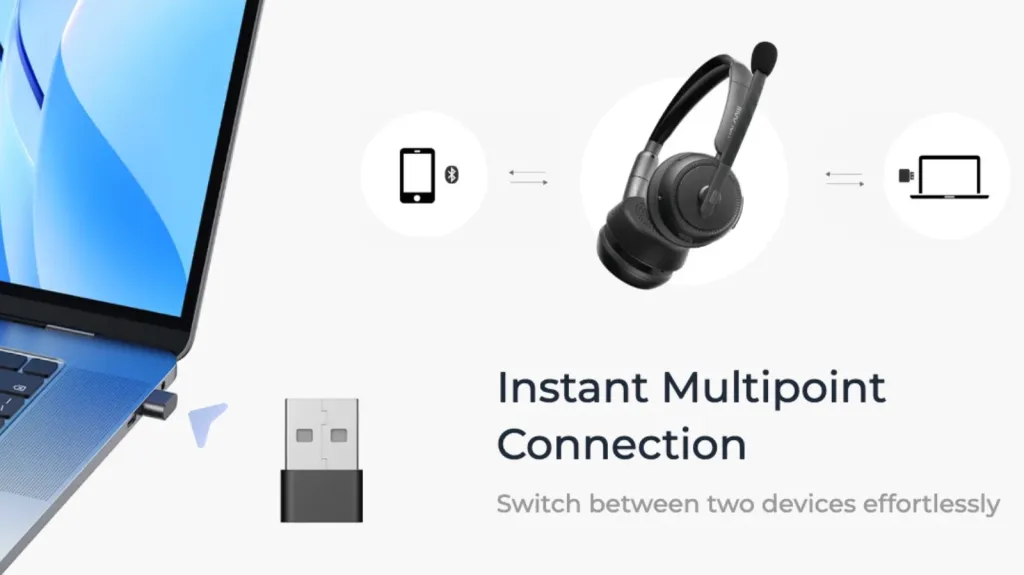
Multipoint is particularly useful for hybrid workers. You can stay connected to your computer and phone at the same time, then switch between meetings and mobile calls without reconnecting.
Best for: Mobile workers, commuters, phone-heavy users, and anyone who regularly switches devices.

Which Connection Is Best for Your Work Setup?
| Your Work Style | Best Choice | Why |
|---|---|---|
| Mostly desk-based | USB dongle | Stable, plug-and-play PC connection |
| Phone-first or mobile | Bluetooth | Easy device switching and portability |
| Laptop + phone | Both | Dongle for PC, Bluetooth for phone |
| No Bluetooth on PC | USB dongle | Adds wireless connectivity |
| Long meetings or calls | USB dongle | More consistent connection |
The simplest rule:
Mostly one computer? → USB dongle
Always switching devices? → Bluetooth
Do both every day? → Choose a headset with both.
The Best Option for Hybrid Work: A Headset With Both
Instead of choosing between Bluetooth and USB, some work headsets support both.
This gives you:
Computer → USB dongle
Phone → Bluetooth
One headset → both work setups
For remote workers who need a best noise cancelling headset with mic for working from home that handles both a stable desk connection and mobile calls, dual connectivity eliminates the need to own separate headsets for different devices.
Two Nuroum models follow this approach.
1.Nuroum HP31D: Best for Desk-Based Work
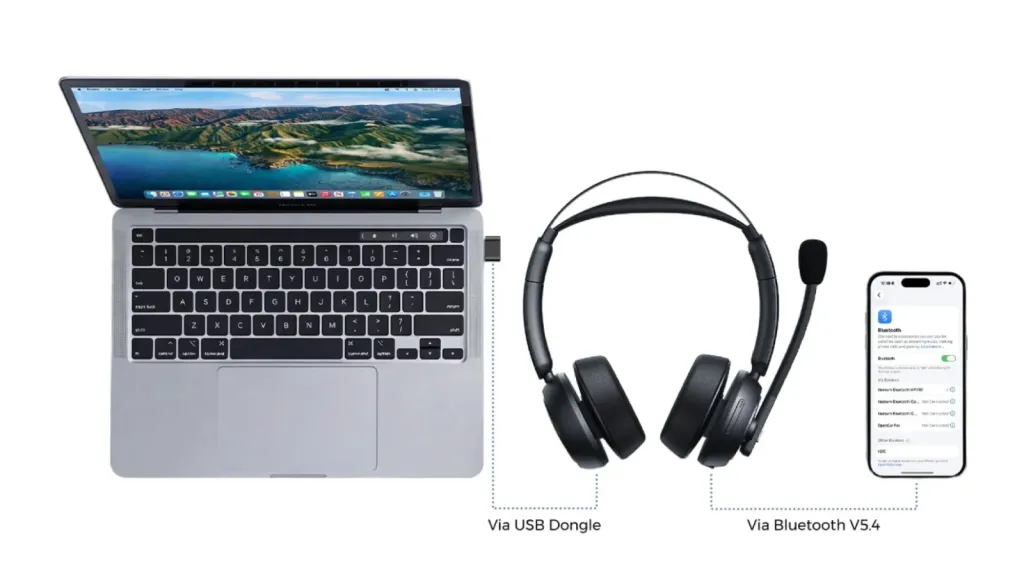
The Nuroum HP31D is designed for professionals who spend most of the day in meetings but still want Bluetooth flexibility.
Highlights
- USB-A dongle + Bluetooth 5.4
- Up to 35 hours of talk time
- Up to 45 hours of music
- 250° rotating boom microphone
- AI-powered ENC noise cancellation
- Dual-ear design for focused work
Best for: Remote workers, office professionals, and meeting-heavy users.
The main advantage is simple: use the dongle for a stable computer connection, then switch to Bluetooth when you need your phone.
2. Nuroum OpenEar Pro 2: Best for Mobility and Awareness
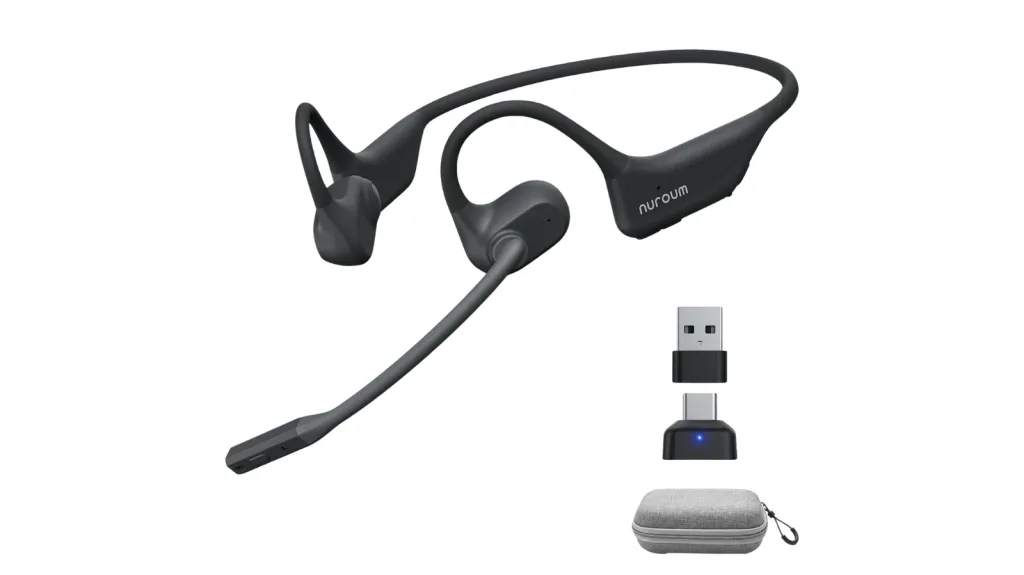
If you prefer a lighter, open-ear design, the Nuroum OpenEar Pro 2 takes the same dual-connection approach in a more mobile format. When comparing the best open ear headset with mic for flexible work setups, the OpenEar Pro 2's combination of USB dongle stability and Bluetooth mobility makes it a strong contender in the open-ear category.
Highlights
- USB-A/C dongle + Bluetooth 5.4
- Multipoint connectivity
- 31g lightweight design
- Open-ear fit for environmental awareness
- Dual microphones with ENC
- Up to 12 hours of talk time
Best for: Hybrid workers, mobile professionals, and users who need to stay aware of their surroundings
How to Choose in Five Minutes
You only need to answer three questions:
1. Where do most of your calls happen?
- At a computer → USB dongle
- On your phone → Bluetooth
2. Do you switch between devices?
- No → One connection may be enough
- Yes → Choose Bluetooth multipoint or dual connectivity
3. Do you need to hear your surroundings?
- No → Dual-ear designs like HP31D
- Yes → Open-ear designs like OpenEar Pro 2
If your workday involves both a computer and a phone, a headset with USB dongle + Bluetooth is usually the most practical choice. For a broader look at the best wireless headset for work that covers different connectivity setups, comfort levels, and price points, the dual-connectivity models in this guide represent the most versatile category for hybrid workflows.
FAQs
- Is a USB dongle headset better than Bluetooth for video calls?
For video calls on a computer, yes. A USB dongle uses a dedicated 2.4 GHz connection that is more stable and lower-latency than Bluetooth, giving you fewer dropouts, less audio lag, and a plug-and-play setup with no pairing step.
- Do I still need a USB dongle if my laptop has Bluetooth?
Not strictly, but it helps. Bluetooth on laptops can suffer from interference and higher latency, especially next to heavy Wi-Fi traffic. A dongle bypasses those problems and also lets the headset work with computers that have no Bluetooth radio.
- Can a headset with a USB dongle also connect to my phone?
Yes, if it supports Bluetooth multipoint alongside the dongle. The HP31D and OpenEar Pro 2 pair to a PC through the dongle while staying connected to a phone over Bluetooth, so you can switch from a Teams call to a mobile call instantly.
- Does Bluetooth 5.4 eliminate audio lag on calls?
It reduces it a lot but not to zero. Bluetooth 5.4 with low-latency support can reach around 30 ms of delay, which is fine for calls and music, while a USB dongle typically delivers a more consistent, drop-free connection across long meetings.